
How AI Tools Helped Me Make My First Home Assistant Contribution

November 12, 2025
As software developers, we've all been there: you're using an open-source project, you notice a missing feature or improvement, but contributing feels daunting because you're unfamiliar with the codebase. The learning curve can be steep enough that many of us simply move on rather than contribute. But what if AI could lower that barrier?
As a happy Home Assistant user who has been tinkering with various smart home aspects, I had the opportunity to test this hypothesis when I decided to add a feature to Home Assistant's Tesla Wall Connector integration. I contribute to open-source projects regularly, but I had never contributed to Home Assistant before and wasn't familiar with its codebase. This experience taught me something valuable: AI tools can dramatically reduce the friction of contributing to unfamiliar codebases, making open-source contributions more accessible than ever.
The Missing Feature in My Smart Home Setup
Home Assistant's Tesla Wall Connector integration allows me to track the charging of my electric vehicle (EV). The integration reports voltage and current for each active phase (which could be one, two, or three phases depending on your setup), but it doesn't report the total active power drawn from the grid.
While voltage and current data are technically sufficient, they require calculation to understand what's actually happening. I wanted a single power reading that would give me immediate insight into my EV's charging status at a glance. It’s a small improvement that makes the integration much more user-friendly.
The technical implementation was straightforward: calculate power from the existing voltage and current sensors and display it as a new sensor in the integration.
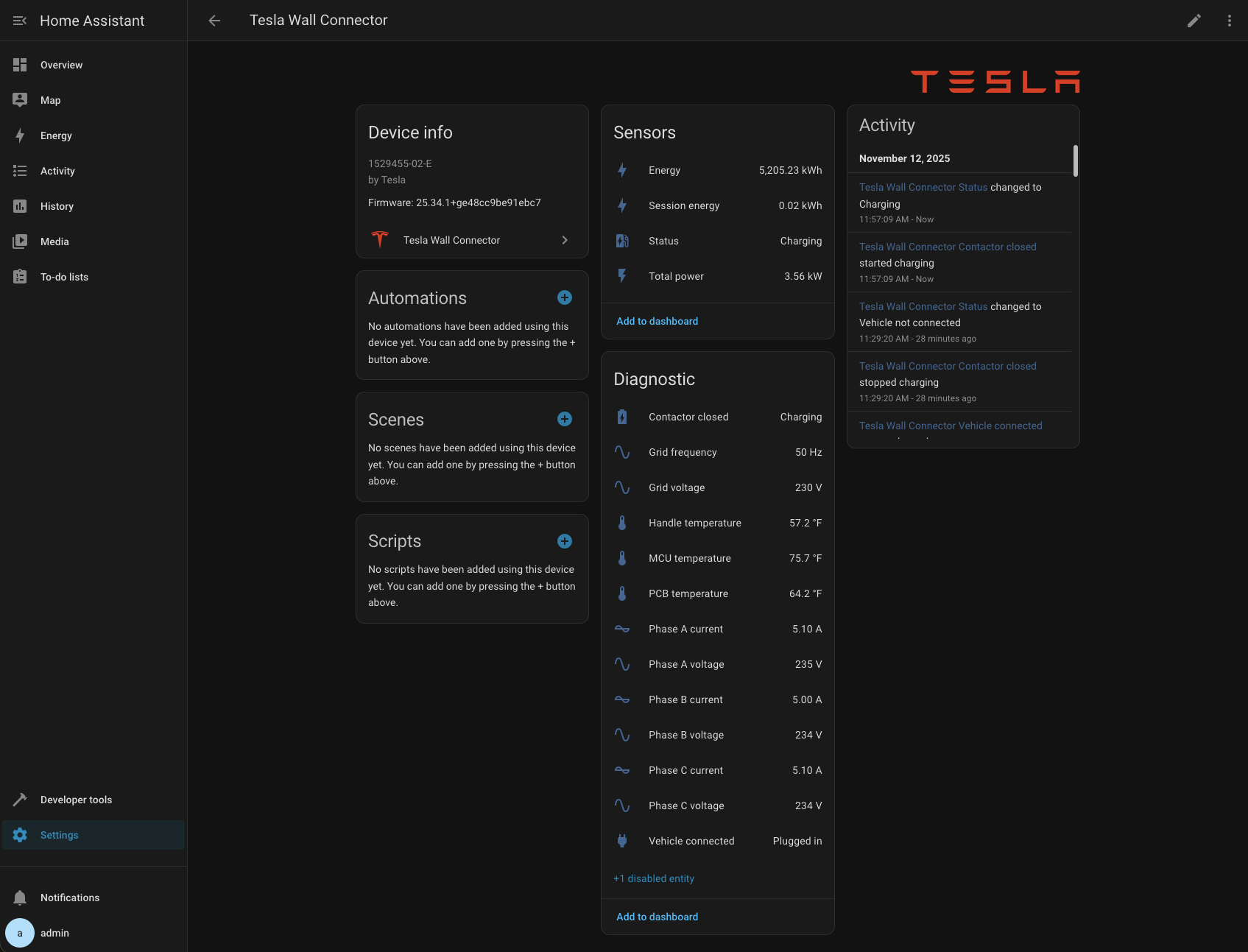
Simple in theory, but I had never contributed to Home Assistant before and wasn't familiar with its codebase structure or conventions.
AI as a Codebase Guide
I decided to use AI tools to help me navigate this unfamiliar territory. Specifically, I used Claude Code (Claude's CLI tool) for implementation and GitHub Copilot for code review. Here's how it went.
Getting Started Without Prior Knowledge
After checking out the Home Assistant core repository, I started Claude CLI and used the /init command to help the AI understand the project structure. Then I provided a single, straightforward prompt:
This is a home assistant git checkout. In homeassistant/components/tesla_wall_connector
there is code for the Tesla Wall Charger integration. Integration reports voltage and
current on all phases that are active (could be one, could be 3, ...). I would like to
add another sensor to it that would display total power drawn from the grid, which can
be calculated from the voltages and currents that are already provided.
That was enough. Claude implemented the feature, including adding tests that I hadn't even requested. I started a local Home Assistant instance, connected it to my Tesla Wall Connector, and it worked out of the box on the first try.
Iterating Through Code Reviews
Of course, getting code to work is only part of the story. It also needs to meet the project's standards and conventions. This is where using multiple AI tools together started to reveal their individual strengths and limitations.
First, I discovered that the AI hadn't completely followed Home Assistant's code formatting standards. I resolved this myself using ruff, Home Assistant's code formatting tool. This was commit 7a662f.
Then I opened a pull request: PR #151028. GitHub Copilot provided a helpful review with two specific requests:
- Replace a lambda function with a separate function
- Store a repeatedly-accessed value in a variable instead of accessing it multiple times
I returned to Claude and explained the requested changes:
You helped me to implement the feature in the current git branch (adding total active
power sensor to Tesla wall connector integration). I published the pull request and I
got two review comments back. One is asking me to not use a lambda function, but to
create a separate function instead. Another is asking me to store a value in a variable
instead of accessing it multiple times. Could you help me implement these changes?"
I'm not entirely sure whether Claude actually read the review comments or simply analyzed the code, but it correctly figured out what needed to be done. This was commit 246a5b.
Copilot provided another review with a minor nit, which I fixed manually in commit 3923f9.
By this point, I had gone through three iterations of improvements, and no human had reviewed the code yet. The combination of AI tools had helped me rapidly improve the code quality before any maintainer time was required.
Interesting Observations and Learnings
AI Couldn't Run the Tests (But Could Explain How)
One curious limitation I encountered: Claude struggled to run the tests itself. I suspect it couldn't figure out that it needed to activate the Python virtual environment before attempting to run them. Interestingly, when I asked Claude how to run the tests myself, it correctly instructed me on installing dependencies, activating the virtual environment, and running the tests. I found this a bit funny/: the AI could explain the process perfectly but couldn't execute it autonomously. This highlights an important point: AI tools still require a developer who understands software development principles and processes.
Different AI Models Produce Different Code Styles
I found it particularly interesting that Copilot preferred code that was slightly different from what Claude had created. This raises an interesting question: would this happen if the same model were used on both ends? Assuming different models were used, this could demonstrate the benefits of using diverse AI models across your workflow. Each model may have learned different patterns and conventions, and their combined perspectives can lead to better code quality.
AI Lowers the Barrier to Open Source Contribution
The most significant insight from this experience is how AI tools can dramatically reduce the friction of contributing to unfamiliar codebases. Without Claude's help, I would have needed to:
- Study Home Assistant's architecture and patterns
- Understand the integration system
- Learn the testing framework and conventions
- Figure out the code style requirements
Instead, I was able to contribute a working, tested feature in a fraction of the time. The AI handled the "how" of implementation while I focused on the "what", which was defining the feature I wanted and ensuring it met quality standards.
Practical Takeaways: Getting Started With AI-Assisted Development
If you're interested in using AI to contribute to open-source projects or accelerate your own development work, here are some practical takeaways from my experience:
-
Start with clear context: Use tools like
/initcommands or codebase-understanding features to help AI grasp your project structure. -
Be specific about what you want: A clear, detailed prompt about your desired outcome is often enough to get started.
-
Expect to iterate: AI-generated code will likely need refinement. Use formatting tools, linters, and code review feedback to improve it.
-
Combine multiple AI tools: Different models excel at different tasks. Don't hesitate to use one tool for implementation and another for review.
-
Maintain developer judgment: Always understand what the AI is doing and why. You're the one who determines whether the solution meets requirements and quality standards.
-
Embrace the learning process: Even when AI writes the code, you'll learn about the codebase by reviewing and refining the implementation.
The Future of Open Source Contribution
This experience gave me confidence that AI tools will significantly change how we approach open-source contribution. The traditional model required deep codebase knowledge before making meaningful contributions. AI tools enable a different model: contributors can focus on problem-solving and feature design while AI handles much of the implementation detail.
Quality control mechanisms, code review, testing, maintainer oversight, remain as important as ever. Instead, it means more people can contribute meaningful improvements to projects they use and care about, even if they haven't spent months learning the codebase.
For open-source projects, this changes the equation. Contributors can jump in sooner, maintainers get higher-quality submissions, and the overall pace of progress improves naturally.
Try It Yourself
If this experience resonates with you, I encourage you to try AI-assisted contribution to your favorite open-source project. Start small, as I did, with a feature or fix that you personally want. Use AI tools to navigate the unfamiliar codebase, but maintain your judgment about code quality and design.
The barriers to open-source contribution have never been lower. The question is: what will you build?
This post is part of Tag1’s AI Applied series, where we share how we're using AI inside our own work before bringing it to clients. Our goal is to be transparent about what works, what doesn’t, and what we are still figuring out, so that together, we can build a more practical, responsible path for AI adoption.
Bring practical, proven AI adoption strategies to your organization, let's start a conversation! We'd love to hear from you.
Related Insights
-
/