
What I Learned Using AI for Drupal Development

February 25, 2026
At Tag1, we believe in proving AI within our own work before recommending it to clients. This post is part of our AI Applied content series, where team members share real stories of how they're using Artificial Intelligence and the insights and lessons they learn along the way. Here, Ajit Shinde (Senior Drupal Developer), explores how AI supported his work on the contributed Trash module, including a complex taxonomy hierarchy challenge, and what he discovered about getting real value from these tools.
How I Used AI to Tackle a Tricky Trash Module Challenge
I have been using AI for work for quite some time now for various personal projects. I was inspired and empowered by Tag1's internal AI workshop, and I started using it extensively for both internal projects and a challenging contrib module assignment. What surprised me most was not AI magically solving hard problems, but how much time it could save on the repetitive parts of the work, especially around writing and iterating on tests. I want to share what I discovered because some of it genuinely surprised me.
The Challenge of Adding Taxonomy Support to Trash
Wanting to find an issue to tackle with AI for my own learning experience, I picked up issue #3491947 to add taxonomy support to the Trash module. The Trash module provides soft-delete functionality for Drupal entities and, once configured, it lets you delete entities temporarily and restore them later or purge them permanently if needed. This sounds straightforward enough, but taxonomy terms have a wrinkle that makes things interesting. When you delete a parent term, Drupal core deletes its children too, and this hierarchical deletion creates real challenges for a trash and restore workflow.
This issue had been open for a while with some interesting discussion about the right approach, and I had actually started working on it earlier as part of Tag1's sponsored open source development. I had created an initial MR that enabled trashing terms, but the hierarchy problem was still unsolved, and I wanted to see how AI would handle the complexity.
The module maintainer, Andrei Mateescu (amateescu), had suggested an elegant approach in the issue queue: since cascading deletes happen in the same request, all the deleted terms would have the same timestamp, so we could use that deleted timestamp to restore child terms along with their parent. It sounded promising, and I wanted to test whether it would actually work. So I started down the path, expecting that if I could lean on the shared deleted timestamp, I might avoid storing extra hierarchy data myself.
First Steps: Planning with Cline
I started with the Cline extension for VS Code in a “Plan” mode (Figure 1).
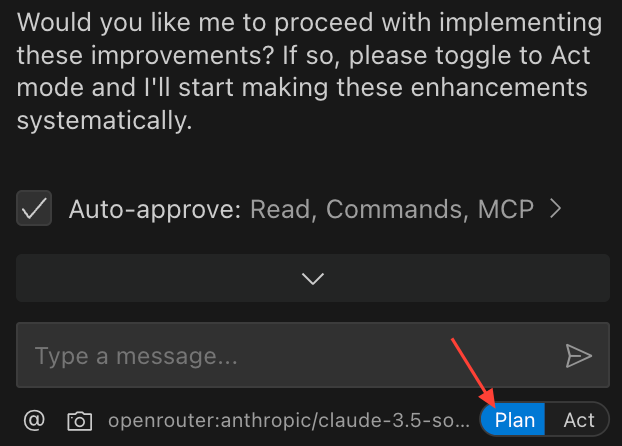
Just for fun, I opened with a prompt asking to help me formulate a plan by going through the issue and studying the Trash module code. It could not access the issue directly, which is actually good from a security perspective, but Claude scanned my project and was able to find the Trash module in it, scanned through the code, and presented a decent understanding of how trashing works. I then explained the hierarchical deletion problem in detail, and the AI checked again and reached the same conclusion I had. When I shared Andreii’s suggestion about using the delete timestamp for restore, the AI presented a three-phase plan covering implementation, basic tests, and optional UX improvements.
At first glance it looked reasonable, but I spotted a major flaw immediately. The AI assumed that deleting a term would trash the parent and hard-delete the children, which is simply wrong. Once trash support is enabled, all terms being deleted move to trash including the children, and every bit of logic that followed was built on this broken assumption. This is exactly the kind of thing that makes working with AI both frustrating and fascinating. There were other misunderstandings (hallucinations) too. So, I decided to start fresh.
After a few trials, I used the following detailed prompt in a new session:
Assume a role of an expert Drupal developer developing a custom feature for the contributed Trash module on a Drupal site. We want the module to support "trashing" taxonomy terms, which is currently disabled.

Background/Current State:
The Trash module adds a deleted column to entity data tables to enable soft-delete/trash functionality.
Taxonomy term trashing is currently disabled via a code line that I can remove to re-enable it.
When a taxonomy term is deleted by default in Drupal, its children (if they have only one parent) are also deleted. This complicates restoration logic.

Goals:
Allow taxonomy terms to be trashed (not hard-deleted), leveraging the module’s infrastructure.
Enable correct restoration of trashed terms, including their child terms.

Technical Challenges:
Taxonomy Overview Page Tree Rendering:\n\nThe taxonomy overview page uses the buildTree function to load hierarchical term data via direct database queries. buildTree currently doesn’t account for the trashed (deleted) column, so trashed terms might break the vocabulary page (e.g., inaccessible, errors). Core updates to taxonomy API are not allowed (must solve without modifying Drupal core).

Restoration Logic for Hierarchies:
The existing trash implementation only restores single entities.
When a parent term is restored from trash, I need to also restore child terms that were trashed at the same time.
All terms trashed together share the same deleted value, which can be used to identify them as part of a single trash operation.

Please provide step-by-step guidance for:
Enabling trash support for taxonomy terms.
Where and how to safely re-enable support (removing the disabling line).
Modifying or extending buildTree (or its usage) without core changes to prevent errors from trashed terms.
Approach for filtering out trashed terms when rendering the tree.

If possible, suggest ways to hook, alter, or override tree loading, limited to contributed/custom code.
Implementing restoration logic for hierarchical terms.
How to batch-restore child terms if their parent is restored from trash.
Using the shared deleted value (timestamp/etc.) to identify child terms involved in the same operation.
Any Drupal hooks or architectural suggestions for this process.
I had to do several trial-and-error iterations to come up with this prompt. With that detailed context, the AI performed much better.
Why This Prompt Worked
This prompt was far more effective than earlier ones because it clearly defined the AI’s role, goals, and constraints from the start.
By identifying the AI as an expert Drupal developer, the prompt aligned its reasoning with real-world Drupal development patterns rather than generic guesses.
Defining clear end goals (enabling trash for taxonomy terms and restoring hierarchical relationships) kept the conversation focused, while listing technical challenges upfront, such as fixing buildTree() behavior without touching core and managing term restoration logic, provided essential guardrails against hallucinations.
Together, these details created a structured context that helped the AI generate more accurate, actionable output instead of speculative or incorrect code suggestions.
It enabled the trash support for taxonomy in configuration by identifying the code. It then tried to fix the listing page queries and failed. I pointed it to use query tags to tag the listing queries and alter them to check if the term is trashed. This was implemented swiftly. The AI implemented a Trash handler for taxonomy terms, which was actually a good decision I had not prompted. But its implementation had a fatal flaw in that it used a class-level array variable for storing the term hierarchy (static caching). This obviously will not work because delete and restore operations happen in separate requests with no persistence between them.
While testing, I found that the trash module automatically trashed the child terms if the parent is deleted. This was expected behavior.
The Discovery That Changed My Understanding
Through old-fashioned debugging and stepping through the deletion flow, I finally understood why the timestamp approach would not work, and it comes down to how Drupal core handles term deletions.
Say you have a hierarchy of terms A and B where A is the parent. When term A is deleted, Term::preSave is called and then the term is deleted. After that, Term::postDelete is called to delete the orphaned children. But here is the problem: When the child term B is about to be deleted, Term::preSave is called again, and that function resets the parent to root before the term gets trashed. This removes any trace of the previous hierarchy entirely.
So even though both terms end up with the same deleted timestamp, we have lost the parent-child relationship by the time they are in the trash. We will need to store the hierarchy data somewhere else, probably with the term itself as others had suggested in the issue. I posted this finding back to the issue queue because it changes the direction of the solution. After that, the maintainer suggested that we pause and reconsider the overall direction of the fix before writing more implementation code. I didn’t want to just stop working at that point, so I decided to focus on something that would still add value: a solid set of tests around the behavior we had uncovered.
I reached this conclusion through traditional debugging, but AI became useful once the solution path was unclear, because it could help me quickly generate and refine tests instead of spending my time on boilerplate.
Starting Fresh and Finding My Rhythm
With the understanding that solving hierarchical restore is tricky and needs more intervention from the module’s maintainer, and that the direction of the fix was on hold, I decided to change how I contributed. Instead of trying to force a solution, I asked AI to help enumerate test scenarios and create tests for trashing, restoring, and purging terms, and it came up with a decent list of scenarios (it applied trashing, restoring, and purging):
- Single term
- Hierarchies with one parent
- Hierarchies with multiple parents
I specifically requested creating atomic tests where one test does one thing. In previous iterations I had noticed it crammed multiple assertions into single tests, but this time it created a comprehensive test class covering all scenarios properly. AI generated the initial test code and structure, and my job was to review, adjust, and guide it toward clean, atomic tests that matched how we actually use the Trash module.
This felt like a real breakthrough in how to work with these tools, namely: you must provide as much context, detail, and guidance as possible in order to get good results.
It tried to run these tests, failed a few times, and I had to step in to explain that the project uses DDEV and tests need to run inside the container. Even then it took three or four more attempts to get the tests running, which tested my patience a bit. As expected, all tests except the hierarchical restore passed.
None of this moved the core solution forward directly, but it still added real value. By using AI to design scenarios and generate most of the test code, I could keep making progress without sinking a lot of time into repetitive work. Those tests now act as a reusable safety net for future changes, so when the direction is finally decided, we will already have a solid foundation to build and iterate on.
Without AI, I probably would have stopped at one or two manual checks or a much smaller test suite, simply because of the time investment. With AI handling the boring parts of writing and reshaping tests, I could afford to cover more scenarios and refine them, even though the underlying solution is still on hold.
Internal Work Showed Me the Real Potential
The Trash module work showed me how AI can help with testing around complex problems, but internal projects are where it really clicked for me. For internal projects, the AI proved more immediately useful, and I got genuinely excited about the possibilities here. For example, on a separate internal project, I needed to create a text filter plugin for rich text formats in Drupal that checks for special unordered lists and replaces them with a Storybook component.
I crafted my prompt carefully based on previous attempts where the AI went wild and tried to implement everything from scratch including the filter plugin, the component, and all the theme functions. In a new session I prompted explicitly that I did not need a new theme function, that it should just use twig include from Storybook, and that it needed to handle nested lists properly since they are multi-level.
It generated a decent filter plugin on the first try, and while there were mistakes of course, I guided it toward modern PHP patterns like attributes and constructor property promotion and PHPStan compliance. A couple of project-specific issues needed manual fixes, but the core implementation was solid.
The tests went really well too. I started with a Kernel test, then tried a Functional test, and eventually settled on Unit tests on the tech lead's suggestion. The Unit test was precise and to the point, and I think this is where AI really shines because the context is clear and limited in unit testing scenarios.
CSS Help Was a Pleasant Surprise
As someone who is mostly a backend developer, this is where I found the use of AI to be genuinely delightful. It quickly understood the project's styling approach, detected that we were using Tailwind, and suggested fixes with basic prompts. No deep context needed, just quick wins that saved me from the usual frustration of wrestling with frontend styling.
Together, these internal projects reinforced the same pattern I saw with the Trash module: AI is most helpful when I give it a narrow, well-defined problem and let it handle the repetitive parts while I focus on the decisions.
The Lessons That Actually Matter
The biggest realization I had is that you need to treat AI as a junior developer who needs clear guidance and supervision. It never replaced my debugging or architectural judgment, but it did make it cheaper and faster to handle the repetitive parts of the work. Providing context aggressively makes an enormous difference, and the more specific you are about the codebase structure the better the results turn out. In my case that meant offloading a lot of test boilerplate, trying out different test structures (Kernel, Functional, Unit), and iterating on scenario coverage without feeling like I was wasting time. Limiting where the AI can scan also helps manage the context window size, which matters more than I initially realized.
I found that spending time in Plan mode before rushing to Act pays off tremendously because it lets the AI think through the problem first. Keeping scope small is also critical since large ambitious prompts lead to hallucinations and broken assumptions while small well-directed tasks actually get completed correctly.
When the AI starts hallucinating, restoring to a previous checkpoint or starting fresh with the same context works much better than trying to correct a conversation that has gone off the rails. I learned this the hard way through several frustrating sessions.
Managing the “context window” for the AI is important. Sometimes starting a fresh conversation makes more sense than continuing with the existing one. I made sure that I exported the context in each conversation, adjusted it and carried that to the next session.
Used this way, AI feels like a junior developer who is great at cranking out tests and repetitive scaffolding, while I stay focused on debugging, design decisions, and understanding the problem. The thing that excites me most is that using AI we can finally do test-driven development without it feeling like a burden. That alone makes learning to work with these tools worthwhile, and I am looking forward to exploring this further on future projects.
This post is part of Tag1’s AI Applied content series, where we share how we're using AI inside our own work before bringing it to clients. Our goal is to be transparent about what works, what doesn’t, and what we are still figuring out, so that together, we can build a more practical, responsible path for AI adoption.
Bring practical, proven AI adoption strategies to your organization, let's start a conversation! We'd love to hear from you.
Image by Cline
Related Insights
-
/