
How-to Guide
The Practical Path to AI Search
Elite Results Without the Infrastructure Bloat

February 9, 2026
In this How-To Guide Jeremy Andrews, Founding Partner/CEO, walks through how Tag1 delivers Google-grade conversational UX and sentiment intelligence without the complexity of vector databases.
Since its debut, Google’s search engine has been the standard by which we’ve evaluated search and search results.
With Google now showing AI-generated summaries at the top of search results, users have begun to expect that same experience everywhere. That makes sense: keyword matching was never really what users wanted from on-site search. If I type “performance issues,” I don’t want a list of every page where those words appear: I want useful information on what’s causing the slowdown, how to fix it, and who can help.
LLMs have changed what’s possible, but most site search is still stuck on keywords. Many decision makers assume AI-powered search means a whole new infrastructure or complex technologies like vector databases and embedding pipelines. It doesn’t have to.
At Tag1, we've been building search systems for clients (and ourselves) that deliver better, expanded search results along with AI-generated summaries, conversational follow-up, and sentiment analysis on top of keyword search. No embeddings, no vector database, no chunking strategies. For content sites with thousands of pages rather than millions, keyword search combined with AI query expansion handles semantic understanding just fine. We'll explain when you actually need vectors and when you're overcomplicating things.
Speed vs. Intelligence
High-quality AI processing of search results can take several seconds, but you can't make users wait two seconds to see something or they'll assume your site is broken.
The solution is progressive enhancement: a four-stage architecture that shows instant results while AI enriches them in the background. The user sees something immediately, then the experience gets better as the AI catches up (Figure 1).
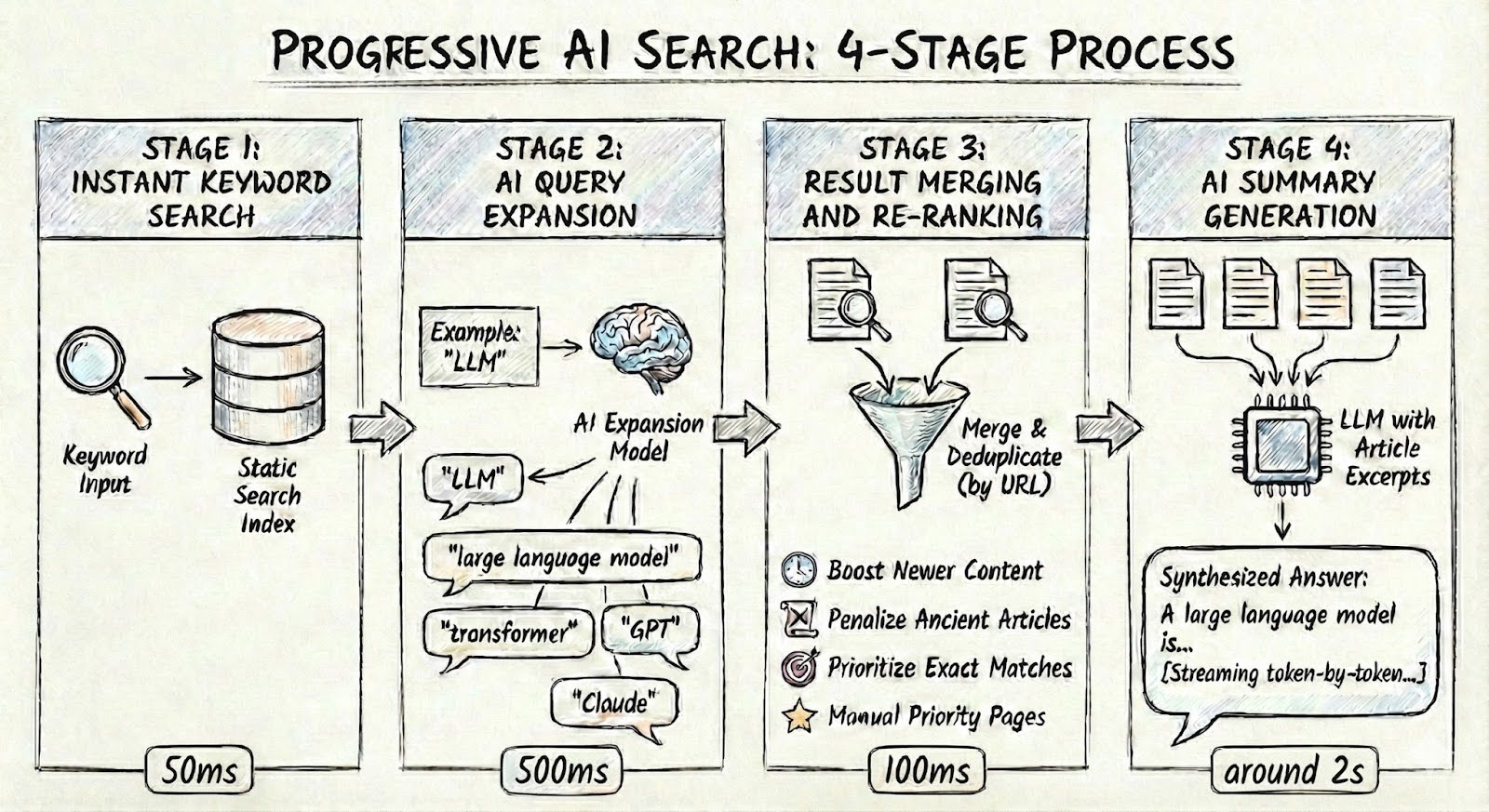
Stage 1: Instant Keyword Search
Instant Keyword Search returns results in about 50 milliseconds using a static search index. We generally recommend Pagefind, a lightweight static search library, as it's simple and fast. Lunr.js, Algolia, Meilisearch, and Elasticsearch are other tools that work. The index is pre-built at deploy time for static sites, or updated on content changes for dynamic sites.
Stage 2: AI Query Expansion
AI Query Expansion is where things get interesting. When someone searches for "performance issues," the AI expands that to related terms like "performance optimization", "web performance", "site speed", and "performance bottleneck". Those expanded terms feed back into the search engine, whether that's Pagefind in the browser or a server-side index. Now you're finding articles that use different terminology for the same concept, and without someone needing to load and constantly maintain a static list of related terms and synonyms.
One thing we learned: filter fairly aggressively. Early on, our expansions included generic terms like "technology" or "solution" that polluted results with barely-relevant pages. The AI is good at identifying synonyms and related concepts, but you need to constrain it.
Stage 3: Result Merging and Re-ranking
Result Merging and Re-ranking combines the original keyword results with the expanded term results, deduplicates by URL, and applies custom ranking signals. We boost newer content, penalize ancient articles, prioritize exact matches over substring matches, and allow manually-specified priority pages for specific keywords. We cover ranking signals in detail below.
Stage 4: AI Summary Generation
AI Summary Generation sends the top results to an LLM with article excerpts and asks for a synthesized answer. This streams word-by-word so users see the response building rather than waiting for it to complete. Two seconds of watching text appear feels faster than two seconds staring at a spinner. And the prompt engineering matters: keep responses concise, cite sources with clickable links, and acknowledge when the search results don't actually answer the question.
The Vector Database Question
The standard AI search architecture generates embeddings for all your content, stores them in a vector database like Pinecone, Weaviate or pgvector, converts each query to an embedding at search time, and finds nearest neighbors in vector space. This works, but for most content sites it's unnecessarily complex.
Query expansion gets you the same semantic understanding with simpler infrastructure. The AI knows that "performance issues" and "site speed" refer to the same concept, so it expands your query to cover both. Traditional keyword search would miss that connection. With expansion, you run multiple fast keyword searches across related terms, then AI synthesizes the results into summaries. Intelligence gets added at read time rather than index time. No embedding pipeline to maintain, no chunking strategy to tune, no index synchronization.
Vector search makes sense at massive scale (millions of documents), when your content rarely uses the terms users search for, for recommendation systems, or for multi-modal search across images and audio. For content-heavy sites with thousands of pages, consistent terminology, and content where recency matters? You don't need it.
Our AI layer runs as serverless functions. Costs scale with usage, zero traffic means zero cost. And if you outgrow keyword search later, the summarization and conversation layers transfer over. You're just swapping how results are found.
Conversation and Sentiment
The architecture so far finds better results and explains them. But the real payoff is what happens after that first answer.
Traditional search forces users to rephrase and start over when they don't find what they need. Conversational follow-up maintains context across questions, and every interaction becomes a signal about whether your content is working.
After the initial search and AI summary, users can ask follow-up questions like "What about performance specifically?" The system extracts keywords, runs additional searches to find newly relevant articles, merges those with the original context, and generates a response that builds on the previous answer. If someone searches for "Drupal migration" and then asks "What about BigPipe?", we find BigPipe-specific articles rather than trying to answer from the original results alone.
Most site search is a black box. Users search, click or don't, and leave. You get click-through rates and zero-result counts but no idea whether anyone actually found what they needed. Conversational search changes that.
Every follow-up carries a sentiment signal: "That's not what I asked" means a content gap. "What do you mean by that?" flags a clarity problem. "How much does this cost?" is a sales opportunity. We classify these automatically using a fast, affordable model (Claude Haiku) running asynchronously so users never wait (Figure 2).
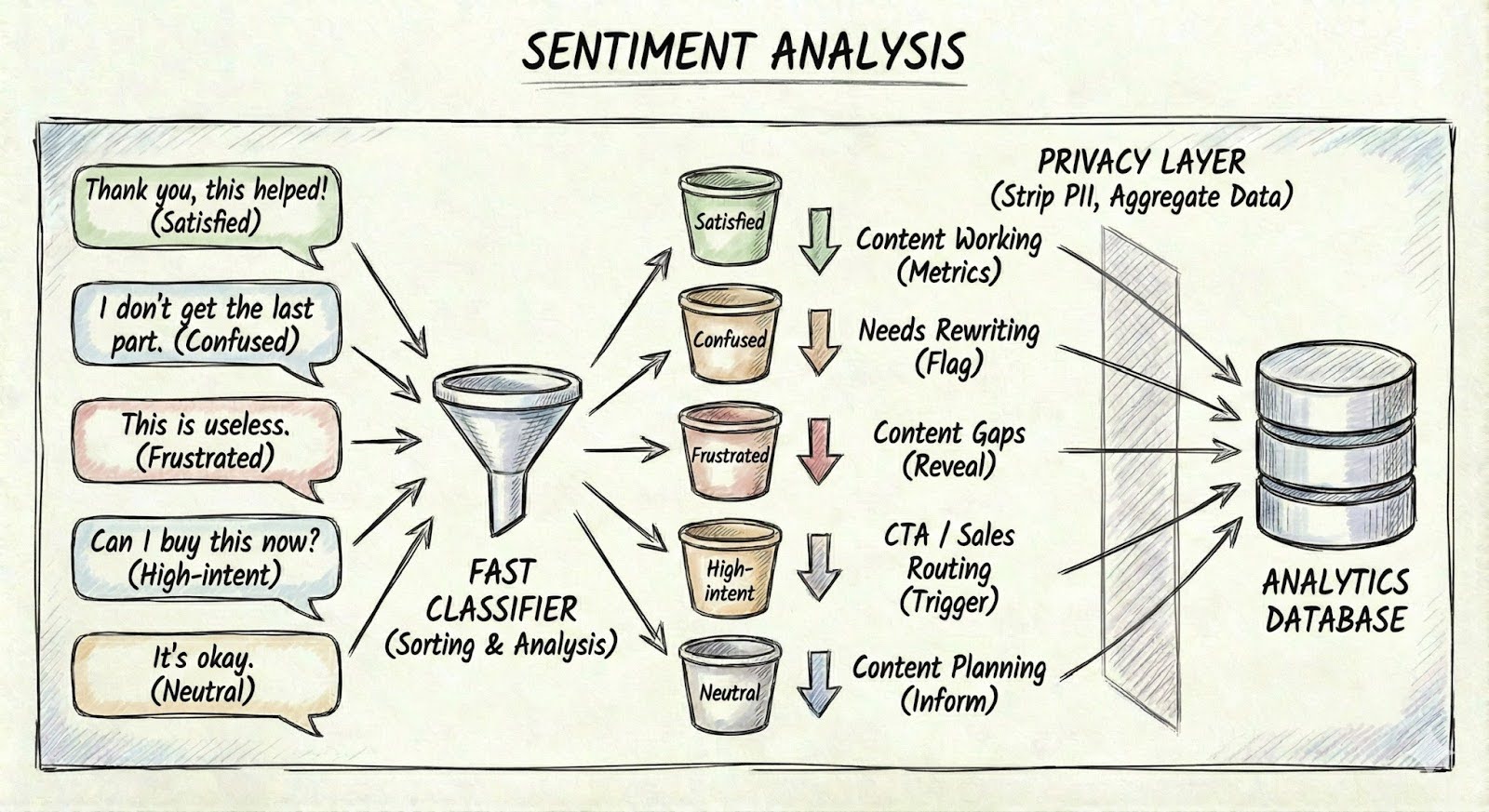
This turns search into a content feedback loop. High "unsatisfied" rates on a topic tell you where to create or improve content. "Confused" responses flag articles that need rewriting. Patterns in follow-ups reveal what second questions people commonly ask, which is direct input for content planning. High-intent queries can trigger contextual CTAs in the response itself, routing prospects to sales in real-time rather than hoping they find the contact page.
A few practical constraints: conversation history grows with each turn, so we truncate intelligently (keep recent exchanges, summarize older ones) and cap follow-ups per session. The interface shows "Question 2 of 3" so users know where they stand. This prevents runaway costs while encouraging fresh searches for new topics. We strip personally identifying information before storing anything and aggregate sentiment data rather than individual conversations. The search system handles classification but not long-term storage or reporting. For that, fire a custom event with the sentiment label and query metadata to whatever analytics package you're already running, whether that's Google Analytics or something like Rybbit. That's where you'll actually spot trends over time.
Ranking and Results
AI finds the right content, but ranking determines what users see first. We layer several signals on top of the base keyword relevance.
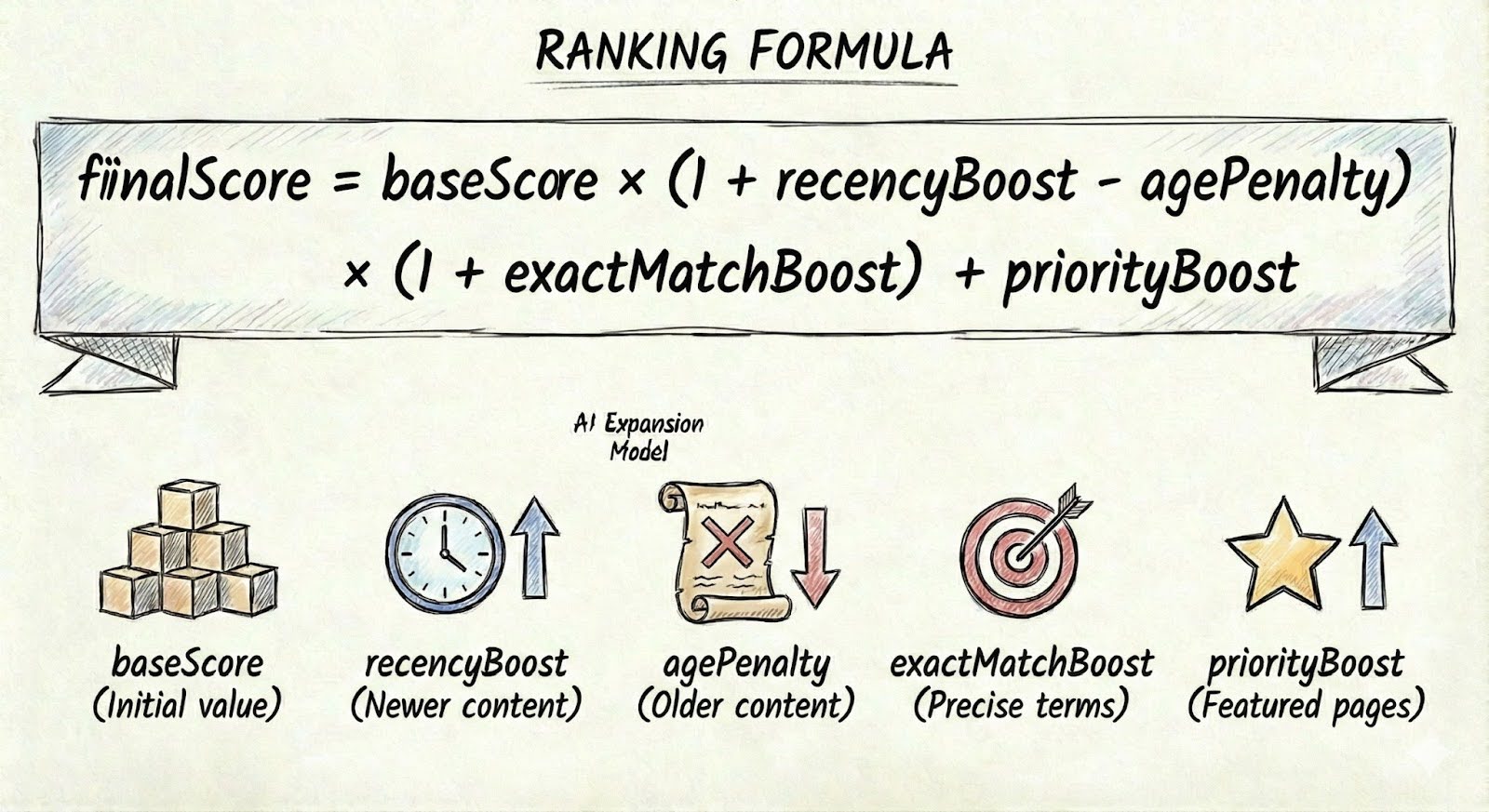
Priority pages let you define authoritative pages for specific keywords. When someone searches "team," the Team page should rank first regardless of how many times "team" appears in random blog posts. Exact match boost ranks results where search terms appear together higher than results where they're scattered, and title matches count more than body matches. Someone searching ""Drupal migration" gets an article titled "Drupal Migration Best Practices" above one that happens to mention "We migrated three sites to Drupal" in the body.
Recency matters too. We use exponential decay with a one-year half-life: brand new content gets a 50% boost, one-year-old content gets 25%, two-year-old content gets 12.5%. Past a threshold (we use five years), an age penalty kicks in, capped at 30% so authoritative older content can still surface. This keeps results fresh without burying material that's still the best answer.
The ranking formula combines these multiplicatively (Figure 3):
On top of ranking, autocomplete with recent search history and title suggestions, content type filters (Blog, White Paper, Case Study), and date range filtering let users narrow results without waiting for AI processing. Accessibility matters here too. Screen readers should announce result counts, and all interactive elements need proper ARIA labels.
Production Realities
Rate limiting prevents abuse. We use 10-30 requests per minute depending on the endpoint, with a sliding window algorithm and distributed state in a KV store. When limits are hit, Retry-After headers let clients back off gracefully.
Cost management means using the right model for the job: in this case, Haiku for sentiment classification, Sonnet for summaries. We cap input and output tokens per request, and cache query expansion results since the same query produces the same expansion.
Track everything from the start: search volume, zero-result rates, AI summary generation time (P50 and P95), follow-up usage, sentiment distribution, and rate limit hits. If legitimate users are getting blocked, your limits are too aggressive.
Getting Started
A few lessons before you dive in: start with strict query expansion filters, because generic terms will pollute your results from day one. Design your analytics event schema before building features, not after. Retrofitting analytics is painful. And think about mobile early, AI features need thoughtful UX on smaller screens, from collapsible panels to attention to streaming behavior on slower connections.
The order we recommend for implementation is: get basic AI summaries working first, then add query expansion and ranking signals, then conversation and sentiment. AI summaries alone are straightforward. Adding the full stack across a complex site takes longer depending on your existing search infrastructure and how ambitious you want to get.
You can try everything we've described on our own site. Head to tag1.com/search and see how query expansion, AI summaries, and conversational follow-up work in practice.
For platform-specific implementation notes covering Drupal, WordPress, Laravel, Django, and static site generators, see the appendix below.
Appendix A: Platform Considerations
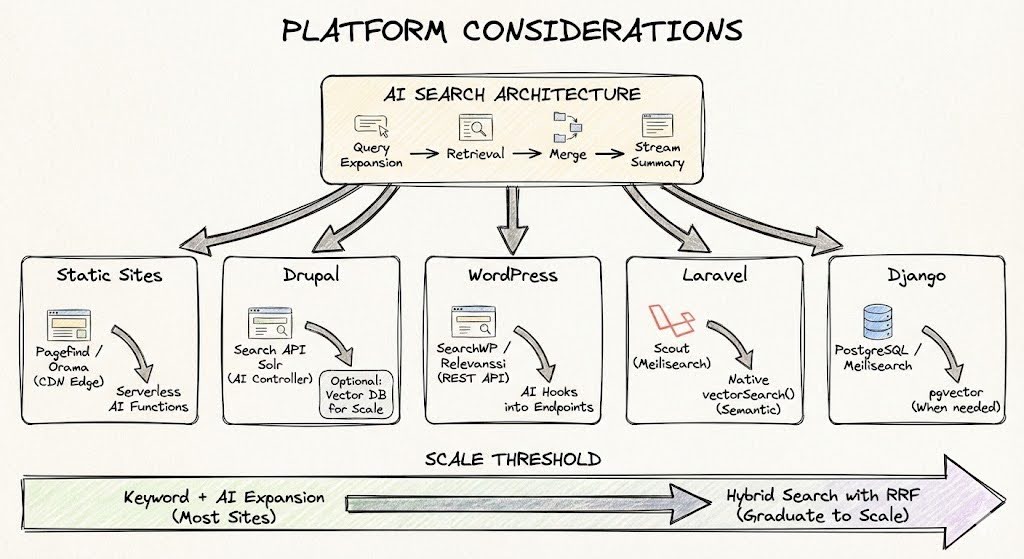
The architecture works across static and dynamic sites, but implementation can differ significantly (Figure 4).
Static Site Generators
For static site generators such as Eleventy, Hugo, Astro, Gatsby, the search index builds at deploy time and typically lives on the CDN. AI endpoints run as serverless functions. Pagefind,is a fantastic solution for static sites, its WASM-based chunked indexing keeps network costs constant regardless of site size (typically under 300kB even for 50,000+ pages). For sites needing semantic search at the edge, Orama offers client-side vector capabilities and can power "chat with your docs" features directly from static hosting.
Drupal
For Drupal, if you're using Search API with Solr or Elasticsearch, the AI layer wraps your existing results. It intercepts queries, expands them, merges results, and streams summaries via a custom controller or API endpoint. Search API Solr already handles sophisticated ranking, and AI adds semantic understanding on top. For headless setups using frameworks like React or Vue, Pagefind handles the search layer and AI expansion runs as serverless functions. At a larger scale, the community has moved toward the AI Search module, which bridges Drupal content to specialized vector databases Milvus, Pinecone, Qdrant with proper content chunking. If you go that route, create dedicated Search API indexes for vectors that bypass traditional text processors. Standard Search API processing (tokenization, stemming, stopword removal, HTML stripping) destroys the semantic information that embedding models need.
WordPress
For WordPress, SearchWP or Relevanssi replace the weak default search and expose results via REST API. The AI layer hooks into those endpoints with the same pattern of expansion, merging, and streaming summaries. SearchWP integrates cleanly. Relevanssi offers more power but creates large index tables that can bloat your database on bigger sites. For e-commerce and high-traffic publishers who've outgrown keyword search, the ecosystem has shifted toward vector solutions. WP Engine Smart Search offers managed hybrid search. The Supabase integration (pgvector plus OpenAI embeddings) gives you open-source semantic search under your own control. Plugins now exist that sync WooCommerce products to Supabase, enabling queries where "running shoes" finds "jogging sneakers."
Laravel
Laravel has Scout, which provides a clean abstraction over Meilisearch, Algolia, or Typesense. Wrap Scout's search results with AI expansion the same way, the pattern is identical. When you outgrow keyword search, Laravel 12 added native vector support directly in the Query Builder with ACID compliance, so vector updates happen in the same transaction as record updates. Use Scout with Meilisearch for the user-facing search bar (typo tolerance, instant autocomplete) and native SimilaritySearch for semantic features.
Django
Django sites typically use PostgreSQL's built-in full-text search for simpler cases, or Meilisearch for better performance. The AI layer hooks into whatever you're running. Django-haystack with Elasticsearch still works but adds operational complexity most content sites don't need. When you need vectors, the Python ecosystem makes it straightforward, pgvector with libraries like pgvector-python lets you filter by metadata and semantic similarity in a single ORM query. Wagtail's Postgres-first search backend now rivals Elasticsearch for most content sites without the infrastructure overhead.
When you hit millions of documents, need recommendation systems, or find your content rarely uses the terms users search for, then you can migrate to a hybrid search that combines keyword and vector results. The summarization and conversation layers you've already built transfer over, and you're just swapping how results are found.