
Building the Document Summarizer Tooltip Module with AI-Assisted Coding
February 18, 2026
At Tag1, we believe in proving AI within our own work before recommending it to clients. This post is part of our AI Applied content series, where team members share real stories of how they're using Artificial Intelligence and the insights and lessons they learn along the way. Here, team member Minnur Yunusov explores how AI-assisted coding helped him rapidly prototype the Document Summarizer Tooltip module for Drupal, while adding AI-generated document previews, improving accessibility, and refining code through real-time feedback.
From Idea to working Drupal prototype with AI-assisted coding
I started with a simple goal: build a working prototype that could summarize linked documents directly in Drupal, without having to spend too much time on it. AI-assisted coding helped me move from idea to an installable module quickly, even though the first versions weren’t perfect. The focus was on getting something functional that I could iterate on, instead of hand-writing every piece from scratch.
The prototype I put together with AI-assisted coding works and can be installed and tested. You can find it on GitHub at https://github.com/minnur/docs_summarizer_tooltip.
Initially, I tried using Cline with Claude Sonnet to generate the module. It produced a full module structure, but the result didn’t actually work in Drupal. JavaScript in particular needed refactoring, so I switched over to Claude Code, which became my main tool for debugging and refining the implementation.
What broke, what worked, and what I fixed with Claude Code
One of the biggest pain points was the tooltip behavior itself. The tooltip wasn’t positioning correctly, which meant the UX felt off and inconsistent. I used Claude Code iteratively to adjust the JavaScript until the tooltip appeared in the right place and behaved in a way that felt natural.
Another issue was that the tooltip wasn’t showing the title as expected. I tracked down the generated function responsible for rendering the header, wired in my own variables, and then asked Claude Code to include that variable in the header output. After that targeted change, the tooltip finally displayed the title properly and felt much closer to what I wanted.
Turning document links into smart, AI-powered tooltips
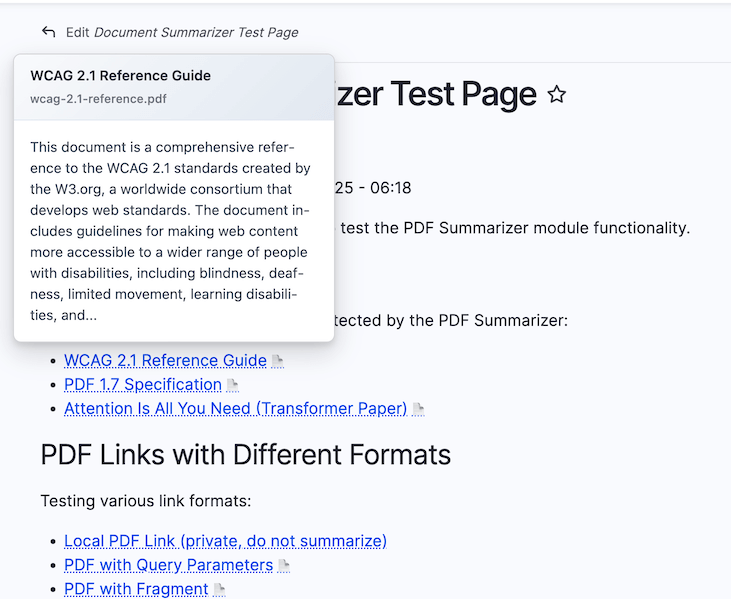
The core concept of the module is straightforward: detect document links on a page and show an AI-generated summary in a tooltip on hover. It started life as a PDF-only prototype, focused on a single file type so I could validate the idea. Once I had the tooltip behavior working smoothly, with correct positioning, title rendering, and consistent UX, I was ready to expand the scope. I asked Claude Code to refactor the module to support more file types beyond PDFs and rename it to “Document Summarizer Tooltip.”
The refactor mostly worked, but the rename was incomplete. Some files kept the old name and needed manual updates. This was a good reminder that while AI can handle broad changes efficiently, it still needs a human to double-check details across Drupal files and configuration.
Accessibility, ARIA, and making AI summaries usable for everyone
Once the basic behavior was there, I wanted to think about accessibility. A tooltip full of AI-generated content is not very helpful if screen readers or keyboard users can’t access it. I asked the AI to help with adding accessibility considerations as a next step, including ARIA attributes and behavior that would work beyond simple mouse hover.
The initial AI-generated settings form went a bit overboard and included more fields than I actually needed. That said, it did a good job of covering a lot of reasonable options. From there, I was able to prune back the form to something simpler and more focused, which also made the UI easier to understand and configure.
What AI got right (and what still needed review)
One thing that stood out to me was how well the AI handled some of the integration details. It added Drupal AI integration and CSRF token support with almost no issues, which saved a lot of time. It also recognized variables I introduced and reused them correctly across functions, which made iterations smoother.
At the same time, the generated code was not something I could just drop in without reading. A few Drupal API calls looked right on the surface but weren’t actually real. That required a thorough review and manual fixes. I didn’t have time to add unit tests for this prototype, but in the future I’d like to see how well AI can help suggest or scaffold tests alongside code changes.
How clients can use AI for prototyping, accessibility, and tests
There are a few clear ways clients could apply this approach. First, AI-assisted coding is very effective for rapid prototyping, especially when you need to validate a module concept before committing a lot of engineering time. Second, using AI to help with accessibility improvements in templates can speed up the process of making interfaces more inclusive.
Finally, I see a lot of potential in using tools like Claude Code to support test creation and maintenance. While I didn’t get to that stage on this project, generating tests, fixing contributed modules, and experimenting with code improvements all look like strong fits for this kind of workflow. The Document Summarizer Tooltip itself could also be directly useful on content-heavy sites that want instant, inline document previews.
If you’d like to explore the code or try the module yourself, the prototype is available on GitHub at https://github.com/minnur/docs_summarizer_tooltip.
This post is part of Tag1’s This post is part of our AI Applied content series content series, where we share how we're using AI inside our own work before bringing it to clients. Our goal is to be transparent about what works, what doesn’t, and what we are still figuring out, so that together, we can build a more practical, responsible path for AI adoption.
Bring practical, proven AI adoption strategies to your organization, let's start a conversation! We'd love to hear from you.
Related Insights
-
/