
Building My AI Assistant

March 9, 2026
At Tag1, we believe in proving AI within our own work before recommending it to clients. This post is part of our AI Applied content series, where team members share real stories of how they're using Artificial Intelligence and the insights and lessons they learn along the way. Here, Jeremy Andrews, Founding Partner and CEO, shares how he built a personal AI assistant with no vendor lock-in: plain text files, a single instruction document, and a morning briefing you can trust.
Folders of Text Files, an Instruction Manual, and No Vendor Lock-in
I founded a technology company that has grown to have nearly 100 people living in over 25 different countries. We have clients worldwide and I contribute to open source projects in my spare time. My wife runs a vineyard and I help where I can, we have two young kids in school in Tuscany, chickens, dogs, cats, a house that always needs something fixed, and I'm always testing out some new technology or idea in my spare time. My TODO list is relentless.
I recently started using Claude's Cowork mode paired with an Obsidian vault as a personal assistant. Not just a chatbot I ask questions to, but a system that triages my email, scans my messaging apps, processes meeting notes, maintains a contact directory, tracks every open item with timestamps, and delivers a morning briefing at the start of each day. It works so well that going back to managing all of this manually would feel like giving up indoor plumbing.
I've started calling the setup “Jesse.” To be clear, the name is a label, not a relationship. It is my personal shorthand for talking about this specific configuration of tools. (I also named my car, my pizza oven, and the lawn mower that keeps trying to kill me.) Naming tools isn't necessary, and I'm aware of the concerns around anthropomorphizing LLMs, but when you're talking to something every morning, it's just easier to have a name to call it than saying "the system" every time. Jesse is short and easy to say in both English and Italian.
This setup has changed how I work enough that I keep telling people about it, and they keep asking for the details. So here they are. I'm using Cowork and Obsidian today, but as I'll explain, Jesse is deliberately not locked to either. The value is in the structure and the instruction file, not the specific tools. I'll also touch on OpenClaw, which has gotten a lot of attention lately but takes a fundamentally different and less safe approach.
The Core Idea
Jesse has two components: a sandboxed desktop agent and a folder of interconnected markdown files. Today those map to Claude Cowork and an Obsidian vault, but neither is load-bearing. A file called JESSE.md at the vault root is the instruction manual that tells the agent who you are, what your priorities look like, what tools are connected, and exactly what to do when you start a session.
I've learned that the quality of the output is entirely a function of the quality of your instructions. A vague instruction file produces vague results. A specific one produces something that genuinely feels like delegating work to a competent assistant. I've revised mine dozens of times and I'm still improving it as I learn what works.
In Obsidian, a vault is essentially a directory structure to organize markdown files which can interlink with each other and sync across devices. For Jesse, the vault structure looks like this:
Dashboard.md              -- Priority-sorted TODO index (Urgent/This Week/Waiting/Backlog)
Today.md                  -- Living daily task list, overwritten each morning
Inbox/                    -- Quick capture from phone/desktop
Projects/                 -- Source of truth per topic
Projects/drafts/          -- Active draft communications
Knowledge/                -- Long-term reference
Knowledge/People/         -- Contact directory (by category)
Knowledge/Reminders/      -- Date-based reminders
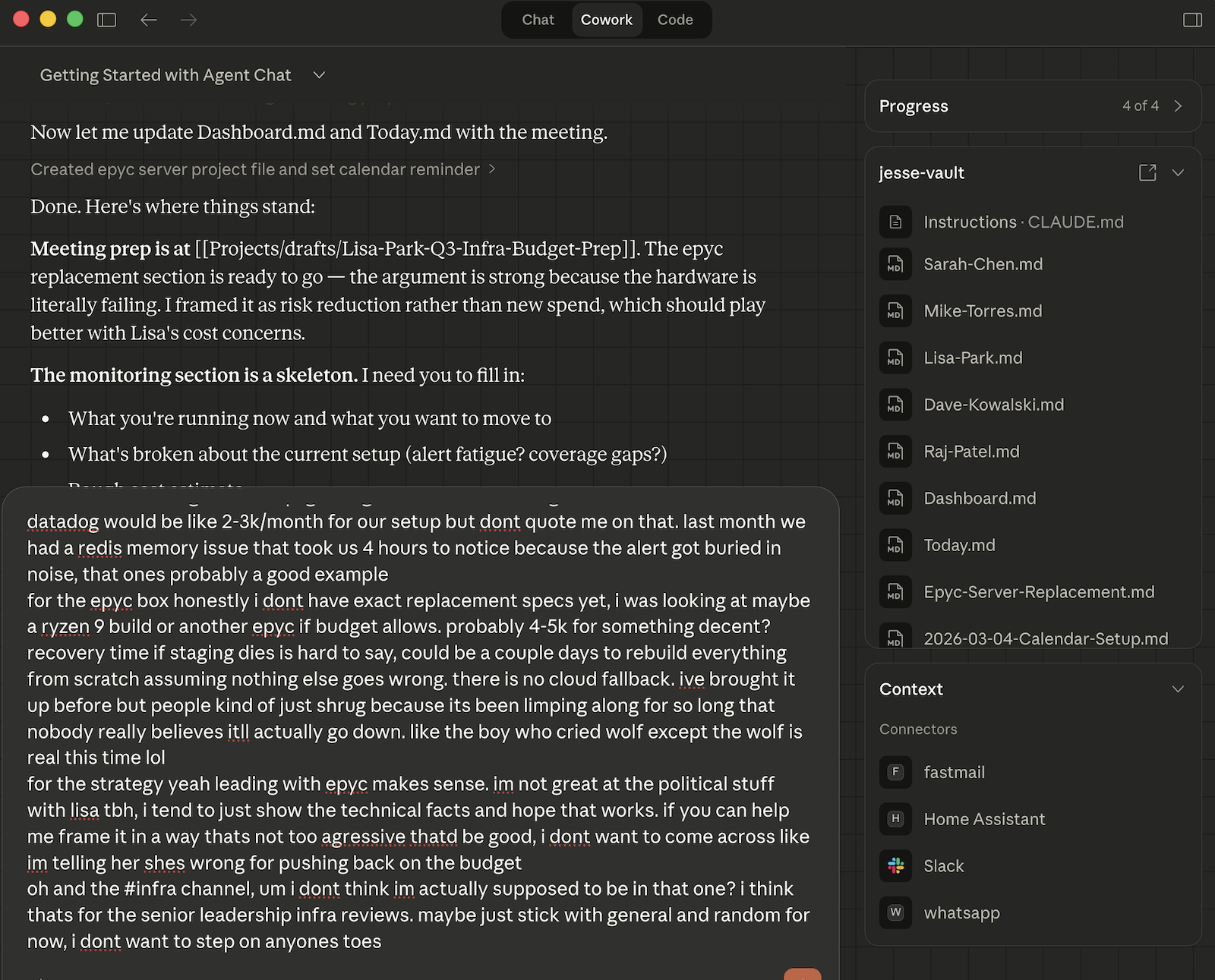
Dashboard.md is the master list. Every TODO has a timestamp showing when it was added and when it was last updated. Today.md gets rebuilt each morning with today's schedule, tasks pulled from Dashboard, and anything new from email or messaging. Project files are the source of truth for individual topics. The Knowledge/People/ directory is a contact database organized into subdirectories: employees, clients, vendors, candidates, and everyone else.
Every file is plain markdown. I can read and edit everything from Obsidian on my phone or laptop.
The Daily Routine
When I open Cowork and point it at my vault, the first thing Jesse does is run a start-of-day routine defined in JESSE.md (in the case of using Cowork, I actually have renamed JESSE.md to CLAUDE.md). The routine has three phases.
Phase 1:
The first phase is gathering. Jesse reads whatever quick notes I dropped in the Inbox folder from my phone overnight, scans my email for anything that needs action (my rule is simple: if it's still in the inbox, it's not done), checks WhatsApp, pulls today's calendar, and runs through whatever other integrations I've wired up. This is just reading. No decisions yet.
Phase 2:
The second phase is where the interesting part happens. Jesse doesn't just file what it found and present me with a list. If I left an inbox note saying "research X," Jesse does the research now, during the morning routine, and writes up the results. If there's a 1:1 on today's calendar with someone who has open items, it flags those items. It extracts TODOs from email and messages into the right project files. I found it important for Jesse to act on instructions immediately as otherwise I just ended up with a growing TODO list.
Phase 3:
The third phase is production. Jesse rebuilds Today.md with the day's schedule, prioritized tasks, and meeting prep notes, then updates Dashboard.md to stay in sync, archives the processed inbox files, and delivers a morning briefing. The briefing is the part I actually read most carefully, because it surfaces judgment calls. LLMs will make prioritization decisions you disagree with, and the only fix I've found is to require Jesse to tell you what it decided and what it chose not to do, so you can course-correct before anything goes sideways. This is important enough that it's a core principle in my instruction file.
What It Actually Does in Practice
A typical morning session produces something like: 'You have three meetings today. I pulled the open items for your 2:00pm and put together prep notes since the last update was two weeks ago. A billing notice came in for a subscription renewal but the card on file expired in January. Your personal email has a vet appointment reminder for Thursday, and your mom's birthday is next week. The Zoom link for your 5:00pm call is here. I created a new contact entry for the person you're interviewing tomorrow because they didn't have one. Here are the three things that need your input this morning.'
That example is from an actual session, lightly edited. The contact entry was created because my instruction file tells Jesse to maintain a people knowledge base: when someone new appears in a meeting, email, or Slack thread, create an entry with their name, role, contact info, and context from the interaction. When someone I already know comes up, update their file with new topics.
Jesse also handles draft lifecycle management, which sounds boring but solves a real problem. Active drafts live in Projects/drafts/. When something gets sent, the key details get extracted into the project file as a permanent record, and the draft gets archived with a date prefix. Before I had this, I had draft emails scattered across three accounts and a Google Doc graveyard that I was never going to organize.
Connected Tools
Cowork supports MCP (Model Context Protocol) servers, which are plugins that give the LLM access to external services. Each one you connect becomes another data source during the morning routine, and the value compounds because Jesse consolidates everything into the vault. It gives me one place to look instead of dozens.
My current setup includes multiple email integrations, WhatsApp via a local Go-based bridge, Google Calendar, and Slack for team communications across Tag1. I live in Italy, where WhatsApp is how everything works from plumbers to the childrens’ school, so that one alone was worth the effort.
I built the personal email connector myself after finding bugs in the existing JMAP MCP server, and submitted a PR upstream with the fixes. The WhatsApp bridge runs as a background service on my Mac and needs a QR code re-scan roughly every 20 days, which is mildly annoying but not so much that I'll stop using it. These are the kinds of rough edges you should expect, as the ecosystem is young.
The Instruction File
The instruction file is where the magic happens. JESSE.md is a markdown file at the root of your vault. If you're using Cowork, rename it to CLAUDE.md and it gets picked up automatically at the start of every session. When people ask me how my AI assistant actually works, the answer is mostly this one file.
The full version is at jesse.help. I've extracted and simplified some pieces here to help better understand the approach.
Everything starts with four principles:
## Core Principles

1. **Act on vault inbox instructions immediately.** When a note in
   Inbox/ says "research X" or "draft Y", do the work during the
   start-of-day routine. Do not defer to backlog.
2. **Track everything until acknowledged.** New items from Inbox/,
   email, or messaging stay visible in Dashboard.md and Today.md
   until I explicitly sign off.
3. **Show your judgment calls.** When triaging priority, filing, or
   interpreting ambiguous instructions, briefly state what you
   decided and what you chose not to do.
4. **Always write in Markdown.** Everything in this vault is reviewed in Obsidian.
The first principle took a few tries to get right. Early versions said things like "process inbox items" and Jesse would dutifully file them into project folders without doing anything. Now if I drop a note that says "research options for renewing the office insurance," I start my day with a useful writeup, not just a TODO item.
I interact with a lot of people, and it can be difficult to remember all the details, especially when I only interact with some people infrequently. This section tells Jesse to maintain a contact directory automatically:
### People Knowledge Base

When working on a task involving a specific person:
1. Check if they have an entry in Knowledge/People/.
2. Create if missing: name, role, contact info, context.
3. Update if exists: new topics, status changes.
4. Categorize: employees, clients, vendors, candidates, other.
5. Never duplicate. One file per person.
6. Cross-link to relevant project files.
This is a simplified version. The real rules include a template for entry format, categorization criteria, and instructions for handling people who change roles. Use the version at jesse.help as your starting point, not what's above.
Over a few months this has grown into a contact database that I actually pull up during calls. When someone new shows up in a meeting or an email thread, Jesse creates an entry. When someone I already know comes up, their file gets updated with the new context.
The draft lifecycle rules are less exciting but have helped me stay more organized:
### Draft Lifecycle

Projects/drafts/ is for active drafts only. Once sent:
1. Extract key details into the project file.
2. Move to Projects/drafts/archive/ with date prefix.
Active drafts live in one place, sent communications get their key details extracted into the project record, and I can clean up the archives whenever I'm inclined, or go back and review.
What's above is maybe a third of the full instruction file. The rest includes the start-of-day routine broken into phases, integration-specific instructions for each connected tool, weekly maintenance routines, and detailed formats for contact entries. Strip out what doesn't apply to you, add your own sections, and iterate. Ask Jesse to help you. Together we've revised mine dozens of times and I'm still improving it.
What I've Learned Along the Way
My first JESSE.md was quite terse. "Here's my vault structure. Scan my email. Build Today.md. That alone was useful enough that I kept going. The elaborate routines, the people knowledge base, the timestamp conventions, the archive lifecycle, all of that grew organically as I hit situations where I needed more structure. Don't try to build the whole thing on day one. You won't know what rules you need until you run into the situations that need them.
Timestamps are important. Without them, your TODO list becomes a graveyard of undated items and you can't tell whether something was added yesterday or three weeks ago, or whether it's been updated since the last conversation about it. Every item in my Dashboard.md has an added date and an updated date. It sounds pedantic until the first time you spot a stale item that's been sitting there for a month, unnoticed.
The vault-as-memory design is one of those things that feels like a limitation and turns out to be a feature. Each Cowork session starts fresh. Claude doesn't remember anything from yesterday. But the vault does, and unlike an AI's memory, the vault is deterministic. Files only change when I change them or when Jesse does during a session I'm directing. Between sessions, I can open Obsidian on my phone, read through everything, rework drafts, fix priorities, all without AI involved. I can see exactly what Jesse knows, which is not something you can say about a vector database that the AI compressed last Tuesday.
Obsidian's [[wiki-links]] also turn a folder of files into something useful. When Jesse updates a project file, it cross-links to the relevant people entries and vice versa. When I'm on a call and need context, I can tap a link in Today.md on my phone and drill into the full project history in two taps. Use full paths ([[Projects/Insurance]] not [[Insurance]]) or your links will break the first time you move a file.
And remember, the instruction file is a living document. Iterate and improve it every time something goes wrong or you learn a better way. Do not be afraid to make changes.
Why Not Just Let the AI Do Everything
There's a philosophical question underneath all of this that's worth addressing directly.
I don't need an AI to replace me. I need to be more efficient with the time I spend on work so I have more time for everything else. I have kids who want to play, animals that need feeding, house projects, and a general desire to spend more time with my wife and less time tethered to a screen. Quality of life matters. The entire point of building Jesse was to compress the administrative overhead of running a company and a complicated personal life into a focused block of time, and then close the laptop.
That means I need to be the one making decisions. Jesse surfaces information, flags priorities, drafts things for my review, and tracks what's open. It doesn't decide strategy, send emails, or make commitments on my behalf. The morning briefing is designed to require my judgment: "here's what I found, here's what I think matters, here's what I'm not sure about, and here's what I think is not important." I read it, I course-correct, and then I move on with my day. The usage of AI is a force multiplier, not a replacement for thinking.
This also keeps me honest about prioritization. Without Jesse, whatever is loudest tends to get my attention first. The most recent email I received may grab my attention before I notice a much more important issue. The morning briefing forces everything into a single view with timestamps showing what's aging, so I work on what matters instead of what's squeaking.
The vault-as-memory model is non-negotiable for the same reason. I retain the knowledge. It's my files, my structure, my notes. If I switch AI providers tomorrow, the vault comes with me. If the model hallucinates, I can open Obsidian and see exactly what's true. I'm not dependent on an API being fast, available, or cheap just to access what I'm working on. If the service is down or I don't feel like burning tokens, everything is right there in a folder on my machine, synced to my phone.
Not Locked In
Portability is a design requirement, not a side benefit.
Jesse is not locked to Claude Cowork. I use Cowork because it's convenient, the MCP connector ecosystem fits my needs, and we have a corporate agreement with Anthropic that covers how client data is handled. But the instruction file is just a markdown document and the vault is just a folder of markdown files. Any sufficiently capable AI agent with file access and tool-calling could run Jesse. I could migrate to another desktop agent, wire it up to an API with a script, or build a custom interface. The value is in the instruction file and the vault structure, not the UI.
Jesse is not locked to Obsidian either. Obsidian is a nice viewer with wiki-link resolution and mobile sync, but the underlying data is plain markdown in directories. You could use VS Code, Logseq, any markdown editor, or just cat and grep from a terminal. If Obsidian disappeared tomorrow, nothing would break except the convenience of tapping links on my phone.
I've watched too many productivity systems die because they were welded to a specific app that shut down, changed pricing, or pivoted away from the features you depended on. Markdown files in a folder will outlast every note-taking app on the market. I chose this stack because it works today, and it will work tomorrow. Nothing about Jesse makes that hard.
On Vibe Coding and Disposable Infrastructure
I was listening to a podcast about Bolt (which has been through as many name changes as OpenClaw at this point) and the broader "vibe coding" movement, and it reminded me of something I wrote about at the Drupal Pivot conference earlier this year.
There are two emerging schools of thought about AI-generated code. One says: code is cheap now, so treat it as disposable. Rebuild monthly. Don't optimize for maintainability because the AI will just regenerate it when requirements change. This is the Bolt thesis, and for prototypes and throwaway experiments it's genuinely useful. I've used tools like this for quick proofs of concept and learning exercises. They're great for that.
But I would not fly in a vibe-coded airplane.
If your system is load-bearing infrastructure, if other systems integrate with it, if people depend on it working reliably at 3am when you're asleep, then "the AI will regenerate it" is not an acceptable maintenance strategy. Production infrastructure requires process, review, understanding of what the code actually does, and the ability to debug it when it breaks in ways the AI didn't anticipate. This is the position I took following the Drupal Pivot and it's the same position I hold for my own projects. I contribute to open source projects where every line goes through design review, testing, and documentation. This is because I've spent 25 years watching what happens to systems that skip those steps.
Jesse is the same philosophy applied to personal productivity. The instruction file is a carefully maintained document, not a prompt thrown together thoughtlessly. The vault structure was designed and iterated over. When something goes wrong, the fix is in the rules, not in hoping the AI figures it out next time. That's the whole reason I'm publishing the template at jesse.help. The process works because it's well-defined.
Comparison: OpenClaw
There's another player in this space worth knowing about. OpenClaw (originally Clawdbot, renamed twice for trademark reasons) is an open-source autonomous AI agent created by Peter Steinberger. It went viral in early 2026, collected over 250,000 GitHub stars to become the most-starred software project on GitHub, and got Peter hired by OpenAI who handed the project to an open-source foundation.
OpenClaw takes a fundamentally different approach. Where Jesse is a desktop setup you open and direct, OpenClaw lives in your messaging apps. It runs as a background service that listens on WhatsApp, Telegram, Signal, Slack, Discord, and iMessage. You text it "remind me to call the accountant at 3pm" and it does. It can run scheduled tasks via cron. It's always on.
The always-on messaging-first interface is genuinely compelling, especially if you live somewhere like Italy where, as I mentioned earlier, WhatsApp is the primary communication channel for everything from school announcements to scheduling the plumber. Jesse requires sitting down at a computer. OpenClaw meets you where you already are.
But there are serious tradeoffs.
Memory. OpenClaw manages memory heuristically. The AI decides what's important enough to remember, indexes it with vector search, and uses RAG to recall context later. This is convenient but unreliable. Facts can get compressed away during context compaction. Jesse's vault is the opposite: deterministic, human-curated, and explicitly structured. Nothing gets remembered or forgotten by accident. I can open it on my phone and see exactly what the system knows.
Safety. OpenClaw runs in what the community calls "god mode": full access to your system, your messaging accounts, your browser. Someone's AI agent famously contacted car dealerships and negotiated prices. Just this week, Meta Superintelligence Labs' own Director of Alignment had OpenClaw bulk-delete hundreds of emails from her inbox after it lost her "confirm before acting" instruction during context compaction. She couldn't stop it from her phone and had to sprint to her Mac Mini to physically kill the processes. Separately, a gateway vulnerability (CVE-2026-25253) allowed arbitrary command execution on exposed instances, and researchers found over 30,000 publicly accessible OpenClaw installations, most with no authentication. Over 1 in 10 community-contributed skills on ClawHub have been flagged as malicious by security audits. Infostealers like RedLine and Lumma have added OpenClaw's config file paths to their default target lists, since credentials are stored in plain text. Jesse takes a much different approach: it currently uses Cowork, which runs in a sandboxed VM with explicit permission prompts for sensitive actions. It can't send a message, make a purchase, or delete a file without asking first. If you're running a business, this matters.
Breadth. OpenClaw has 5,700+ community skills compared to Cowork's much smaller set of MCP connectors. It can talk to almost anything. Cowork's ecosystem is growing but it's not there yet.
Getting Started
I've published a starter template at jesse.help. It contains the sanitized instruction file from this post plus a README explaining how to set it up. Clone it, rename the instruction file to CLAUDE.md if you're using Cowork, edit it for your situation, and point your AI agent at it.
The quick version:
-
Install Obsidian (free) and create a new vault, or just create a folder. I pay for Obsidian Sync ($4/month or so) to keep the vault backed up and available on my phone. It's not required, but I ran into enough edge cases trying to sync manually through iCloud that it was worth paying for.
-
Clone the starter template from jesse.help. It includes the vault structure and instruction file. Rename
JESSE.mdtoCLAUDE.mdif you're using Cowork.The site also has recipes, modular add-ons that improve how Jesse handles specific tasks like research, writing voice, and meeting prep. Browse what's available and add the ones that fit your workflow. New recipes get published as the project evolves. -
Open your AI agent of choice (I'm using Claude in Cowork, but it shouldn't be difficult to adapt to other solutions), point it at the folder, and start a session.
-
Ask it to run the start-of-day routine. See what happens. Work with Jesse to fix any problems.
-
Update Jesse throughout the day as you complete tasks or as new things come in.
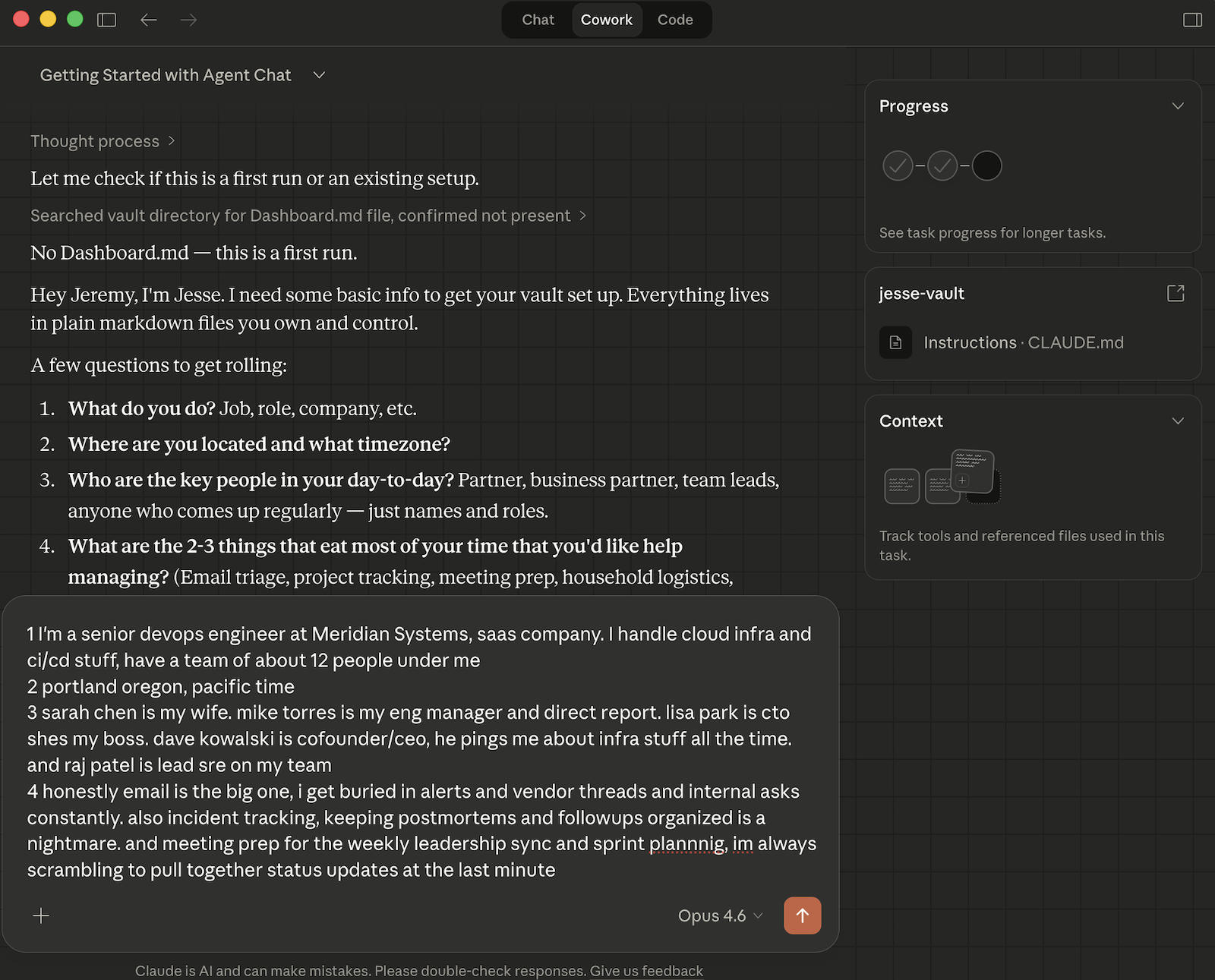
Figure 2: First-time setup conversation.
The starter template should get you something useful on the first session. It won't be perfect. You'll find instructions that are ambiguous for your situation, and the AI will make choices you'd make differently. That's expected. Work with Jesse to tighten the instruction file, add rules for the situations you encounter, and within days you'll have something that genuinely reduces the overhead of managing a complex workload.
The technology is early. Sessions don't persist, MCP connectors can be flaky, and the sandboxed VM occasionally has sync issues. But the core pattern is sound: structured markdown as the knowledge store, a detailed instruction file driving an AI agent. The better the instruction file, the more useful the agent. And unlike a SaaS product, everything is yours to keep.
I iterate and improve Jesse regularly, and the template at jesse.help will keep up. If you build on it, I'd love to see what improvements you make.
This post is part of Tag1’s AI Applied content series, where we share how we're using AI inside our own work before bringing it to clients. Our goal is to be transparent about what works, what doesn’t, and what we are still figuring out, so that together, we can build a more practical, responsible path for AI adoption.
Bring practical, proven AI adoption strategies to your organization, let's start a conversation! We'd love to hear from you.