AI & Design: The New Creative Partnership
From theory to practice: AI and the creative workflow

April 29, 2026
In 2017, Microsoft tried to recruit me. They were looking for creative directors to help level up their experience design capability and flew me out to their Seattle headquarters for a three-day interview marathon. When the recruiter asked what excited me most, I mentioned several interests, but among the most compelling was artificial intelligence. Looking back today, I was right to sense that AI would change everything.
The intersection of artificial intelligence and design is no longer a distant possibility; it’s the present reality. Since OpenAI, Anthropic, and other tech companies have transformed the AI landscape, these technologies have become deeply embedded in virtually every creative tool available to designers. As AI tools become increasingly sophisticated, designers around the world are discovering that these technologies aren’t replacing creativity; they’re amplifying it. This new partnership between human intuition and machine intelligence is fundamentally transforming how we approach design challenges, from conception to execution.
Over the past few years, I’ve actively explored this evolution, testing AI-enhanced applications, experimenting with standalone tools, and integrating these capabilities into my professional work. In my day-to-day work, I’ve seen AI change design in three big ways: it speeds up some of the slower production parts of the process, it opens up more directions to explore, and it makes it even clearer where human talent, taste, judgment, and direction really matter. The sections that follow walk through each of these shifts with real examples of how they show up in everyday projects.
Transforming Research
On a recent discovery project, I faced a familiar UX challenge: eight hour-long stakeholder interviews requiring careful synthesis. Traditionally, this means days of rewatching recordings and manually compiling insights. Instead, I used Otter to process the interviews, generate summaries, and extract key points. When I recalled a specific client comment but couldn’t remember which interview it came from, I simply asked the AI to locate it. Hours of manual searching became seconds of precise retrieval, freeing me to focus on strategic thinking rather than administrative tasks.
Finding My Copy Partner
As an artist who studied graphic design, I’ve always approached projects visually first. Throughout my career, I’ve worked with and without a copywriter, and AI has become a genuine accelerator for idea generation and for writing copy on my own. I’ve tested Claude, ChatGPT, Gemini, and many other AI applications for everything from presentations to blog posts to logos and webpage content. Claude has become my preferred partner overall for writing because it seems more intelligent than other AI platforms. It has a genuinely writerly approach, offers nuanced options, explains its reasoning, and even recommends its favorite among the alternatives. ChatGPT is capable, and its reasoning is good, but it makes more mistakes. I find Claude’s responses more in-depth and considered, which is why I keep returning to it.
That said, AI still lacks what makes humans truly irreplaceable: original creative thought. These tools recognize patterns in data; they don’t ideate the way a real copywriter does, drawing on individual and authentic emotional and physical experience. Rely on AI alone and you risk losing the essence of creativity, generating remixed ideas instead of truly original ones. This is part of what’s behind the wave of “AI slop” online: work that lacks authenticity and reality. The strongest results still come from an experienced designer or copywriter directing and editing AI output.
Figma: AI Integrated Into the Design Canvas
Figma has embedded AI features across its design platform. Figma Make generates interactive prototypes from natural-language prompts. First Draft produces starter layouts from a few inputs, and other AI features handle parts of the workflow like renaming layers, generating placeholder content, translating copy, and searching across design files. The capabilities live inside the tool designers already use, which removes the need to import and export between apps. How useful any of this is depends heavily on the designer and the project; some find these features a meaningful time-saver, others rarely touch them.
Photoshop: AI Retouching in Practice
Adobe’s AI integration in Photoshop has evolved steadily. Generative Fill extends photographic backgrounds and reshapes images to new aspect ratios, which is useful when a vertical photograph needs to become a horizontal header. The “Remove” function eliminates unwanted objects and intelligently fills in lighting, texture, and perspective. These features save a lot of time, sometimes minutes, sometimes hours of hand-editing photos.
The 2026 release added several capabilities worth noting:
- A reference-image option in Generative Fill, where you upload a visual source to guide the result rather than relying on text prompts alone.
- Harmonize, a one-click tool that matches lighting and color when blending objects into a composite.
- Generative Upscale for enlarging images while preserving detail.
- A conversational AI assistant for natural-language editing.
Photoshop also now supports multiple AI models inside Generative Fill: Adobe Firefly, Google’s Nano Banana Pro, and Black Forest Labs’ FLUX. Now you can pick the engine best suited to the task. These additions make compositing and retouching workflows noticeably faster, though for genuinely complex work a human touch is still needed.
Generative AI: Images and Video
Image and video creation has evolved rapidly. I’ve used Midjourney and directed teams using it for creative concepting, though copyright concerns meant we ultimately hired artists to recreate the AI concepts, so our clients owned the original artwork. Google’s Nano Banana creates original images and can composite multiple photographs into a single scene. ChatGPT just launched a new image generator. It’s quick and convenient compared to Midjourney and having to create a Discord account to access it. On the brighter side, portrait AI tools have improved dramatically. Headshots now come much closer to actual likenesses of uploaded photos, rather than the game-like avatars they used to produce.
Video generation has advanced quickly. Google’s Veo 3.1 creates short videos from simple text prompts describing setting, character, and dialogue, and now supports storyboards, editable animatics, and turning recorded presentations into video. Runway offers full video editing and is strong on B-roll generation. Kling, the Chinese generator from Kuaishou, handles complex motion with realistic physics, produces longer clips, and is known for image-to-video animation and multi-shot cinematic sequences. It recently launched 4K output. I haven’t tried it yet, but the marketing campaign demonstrates impressive fine detail.
The biggest signal of where this is heading is Netflix’s reported acquisition of InterPositive, Ben Affleck’s AI filmmaking startup, in a deal that could reach $600 million. Affleck quietly built the company over four years by filming a proprietary dataset on a controlled soundstage, what’s come to be called the “gray cube,” where actors perform against a neutral backdrop, almost like a green screen, and AI fills in backgrounds, lighting, and environmental details in post. The tools alter existing footage rather than generate new content, handling tasks like background replacement, continuity fixes, lighting adjustments, and removing stray elements from a shot. David Fincher has already used them on an upcoming Brad Pitt film. AI in filmmaking is no longer hypothetical; it’s being built directly into the production workflows of the biggest studios.
Addressing the Copyright Challenge
Copyright remains a significant challenge in AI-generated imagery, and some companies are working thoughtfully to solve it. Some stock houses have built a proprietary AI library trained exclusively on licensed work, with direct permission from photographers, illustrators, and artists. Users can create custom imagery without copyright concerns, an ethical middle path that respects creators while enabling new possibilities.
Where AI Falls Short
Some creative challenges expose the current limits of AI, and logo design is the clearest example. I’ve tested numerous AI logo tools, including Claude, ChatGPT, and Gemini, and the results have been consistently underwhelming. This reveals where human expertise remains essential. Great logos are profoundly difficult even for experienced designers, demanding brainstorming, sketching, critique, and refinement. Occasionally, a designer captures lightning: a napkin scribble becomes Milton Glaser’s “I ❤ NY” or Carolyn Davidson’s Nike swoosh. These marks evoke nostalgia, laughter, tears, awe; they distill entire cities or movements into simple symbols that resonate across cultures and generations.
Current tools mash up database elements, such as fonts, shapes, and colors, without the underlying logic or emotional intelligence that distinguishes a forgettable logo from an iconic one. Workflow improvements do exist: Claude can now generate downloadable Illustrator files from its sketches, which designers can refine in vector tools. It’s a useful bridge, but it doesn’t solve the core problem, which is that a polished file exported from weak conceptual work remains weak conceptual work. AI can assist ideation, but craft, refinement, and expertise still come from people.
The Agentic Frontier
A notable recent shift is the rise of agentic tools that execute multi-step design and development workflows from a single prompt. Lovable generates functional web applications from natural language, moving from static mockups to working prototypes. It can struggle with rapid iteration. Even the kind of fast, successive font and sizing changes a designer naturally makes during exploration can cause errors to stack up.
Luma Labs has positioned itself as a creative force multiplier. Its agents work across video, image, audio, and text, carrying shared context from planning through final delivery so a single prompt can move from storyboard to video to social campaign to brand asset without losing the look and feel or voice and tone of the brand. The platform supports rapid concepting for advertising and brand campaigns, animated storyboards, cinematic ad spots, motion graphics, and multi-format social content. Brand consistency is maintained as the agents move through the workflow, which makes it especially useful for teams producing high volumes of variant content. It expands what a small team can produce, and for agencies and in-house creative groups, it’s becoming a meaningful production option.
Claude Design
Claude’s design capabilities are a recent development worth noting, and the differentiator is context awareness. Upload a comprehensive brand guide, and Claude produces landing pages, marketing materials, and UI components that are coherent with the established brand, using the typography, color systems, spacing conventions, and tonal sensibilities you’ve defined. Without proper brand input, output trends toward generic. With a thoughtful brand guide as context, the work comes close to what a designer would produce. The lesson: AI performs better when given rich creative direction.
Claude can produce prototypes, either high-fidelity designs or wireframes, from a single prompt. It can also generate well-designed slide decks if you’ve given it your brand guide, with controls for adjustments like font size. Design system generation is one of its more useful outputs. Claude can produce comprehensive systems: component libraries, typography scales, interaction patterns, and usage documentation based on brand guidance. Building a design system traditionally takes weeks or months, especially when documenting every button state, every component, and other design details. Claude generates that foundational work faster. The output isn’t always final, but it establishes the systematic thinking and documentation patterns that normally consume significant team resources. In one test, I uploaded an image, a logo, and a short company description, and Claude extrapolated a comprehensive design system that was surprisingly on point, even suggesting fonts based on the custom typography in the logo.
Claude Design also exports directly to Claude Code, packaging the prototype as a handoff bundle that the coding agent reads natively, turning a design into production code without the traditional design-to-development translation step. The limitations are predictable. Claude doesn’t yet create original logos that capture brand essence, nor does it develop branded color palettes from scratch in a way that feels genuinely considered. But give it an existing palette or even an image to extract one from, along with a typography system and a logo, and it applies them well across a project. One friction point: the Canva plugin for editable files doesn’t yet work reliably. That’s the kind of rough edge we can expect to see resolved as these tools mature.
How Designers Can Evolve by Embracing the AI Partnership
AI’s current role in creative work is nuanced. The technology helps with specific tasks, such as analyzing interview transcripts, extending photographic backgrounds, generating writing alternatives, producing video storyboards or animatics, creating design systems from brand elements, and executing brand-consistent design when given proper guidelines. It’s still developing in other areas, such as original logos, facial details in composites, and the subtle qualities that make creative work exceptional. The output benefits from careful review and editing.
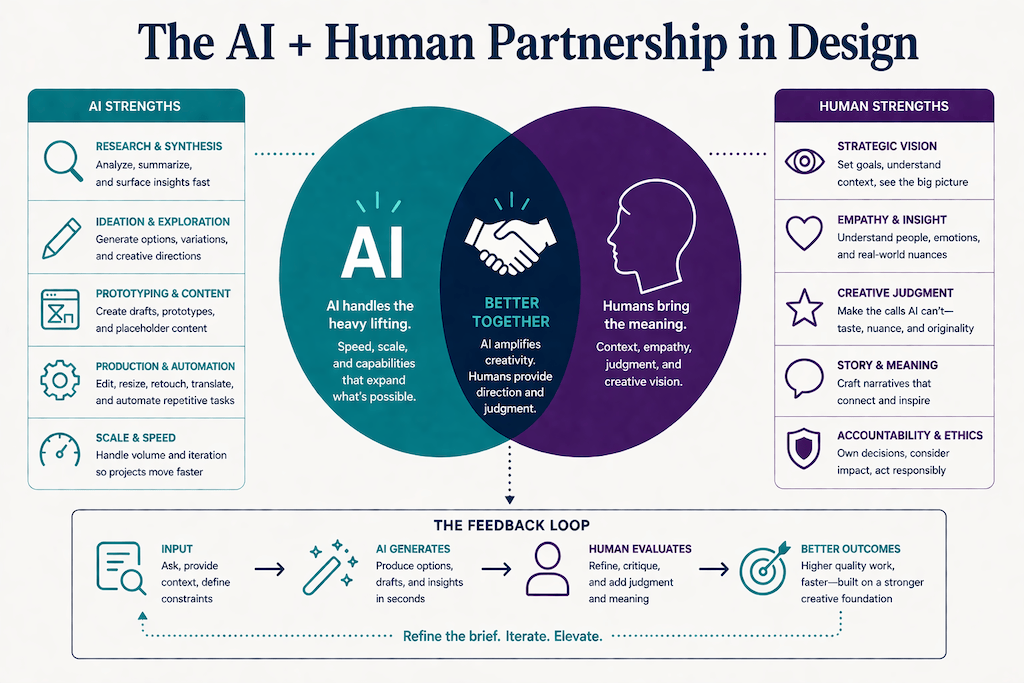
AI isn’t replacing creativity or professional judgment; it’s transforming the design and creative workflow, making some things faster and shifting where designers spend their time. What’s become clearer is where human expertise remains essential. The designers who thrive will be those who treat AI as a collaborator, using it in places where it genuinely accelerates the work. The future of design isn’t human versus machine. It’s human + machine working together, the next evolution of human creativity.
Bring practical, proven AI adoption strategies to your organization — let’s start a conversation! We’d love to hear from you.