From an Idea to Two Languages: How AI Transformed a Slack Command into a Learning Journey

January 29, 2026
It all started with a concrete need: quickly translating messages in Slack before sending them to colleagues. A simple problem that led to a solution far richer than expected and an unexpected detour into a completely new programming language.
Why AI Instead of Traditional Translation?
The obvious solution would have been integrating Google Translate or DeepL. But I had two motivations pushing me toward a different path. First, I wanted hands-on experience with AI-powered development to sharpen my skills in this rapidly evolving field. Second, I was intrigued by the possibilities for expansion and customization that a traditional translation API couldn't offer, like providing feedback when a message might be culturally inappropriate or carry unintended connotations in certain contexts.
The Idea Takes Shape
I didn't jump straight into code. My first session with Claude wasn't about architecture or technologies, but something more fundamental: refining what I wanted to build.
I came to the conversation with a fairly clear technical picture and a feature list, but I asked the AI for suggestions to push the concept further, to find something more innovative. The dialogue helped crystallize and expand ideas I already had: AI as an amplifier rather than a generator of concepts.
Through this collaborative refinement, the specifications took shape: translation with tone adaptation, context awareness, conversation history, and cultural sensitivity feedback.
Planning the Architecture
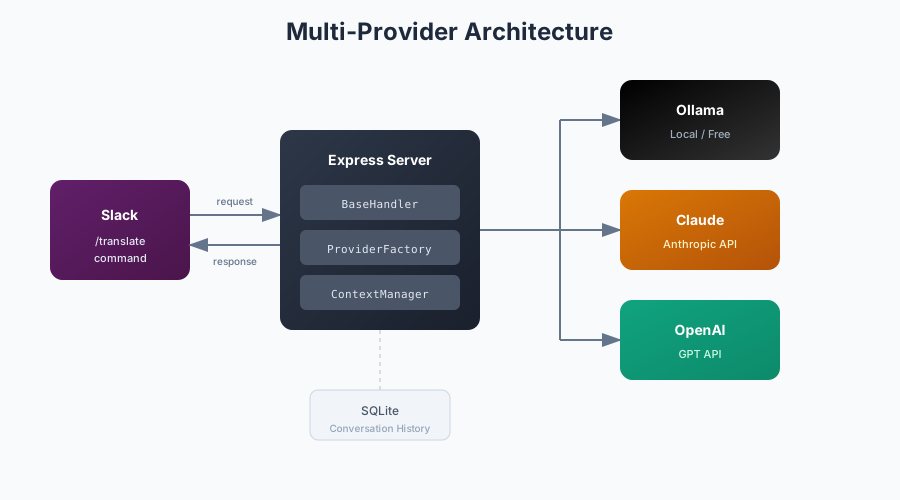
Only after this definition phase did I move to technical planning. A key decision emerged early: supporting multiple LLM providers, including Ollama for local testing, Claude, and OpenAI for production.
This wasn't just about flexibility for end users. My background has trained me to think in scalable solutions from the start, and practically speaking, being able to test locally with Ollama before consuming API credits made the development cycle much smoother.
The multi-provider architecture required a clean abstraction layer. Working with AI, I developed a modular pattern with a base provider interface and specific implementations for each LLM:
providers/
├── base.js      # Abstract interface
├── ollama.js    # Local/free option
├── claude.js    # Anthropic API
├── openai.js    # OpenAI API
└── index.js     # Factory/router
The pattern itself emerged from collaboration with the AI. I described the requirements, and through iterative dialogue we arrived at a structure that kept the code clean and extensible.
Technical Deep Dive: The Node.js Implementation
The server is built on Express, handling both a test endpoint and the Slack command integration. One critical aspect of Slack slash commands is the 3-second response timeout — if you don't acknowledge within that window, the command fails.
The solution is a two-phase response pattern:
app.post('/slack/commands', async (req, res) => {
  const { text, user_id, channel_id, response_url } = req.body;

  // Acknowledge immediately (Slack requires response within 3 seconds)
  res.json(handler.getImmediateSlackResponse());

  // Process asynchronously
  await handler.processTranslateCommand(text, user_id, channel_id, response_url, db);
});
The immediate acknowledgment satisfies Slack, while the actual translation happens asynchronously and gets posted back via the response_url.
The provider abstraction uses a base class pattern:
class BaseLLMProvider {
  async generate(prompt, conversationHistory = []) {
    throw new Error('generate() must be implemented by provider');
  }

  buildContext(conversationHistory, currentPrompt) {
    return contextManager.buildOptimizedContext(conversationHistory, currentPrompt);
  }
}
Each provider (Claude, OpenAI, Ollama) extends this base class and implements its own API integration. The Claude provider, for example, uses the native fetch API to call Anthropic's messages endpoint, handling model selection, token limits, and temperature configuration.
Crafting the Translation Prompt
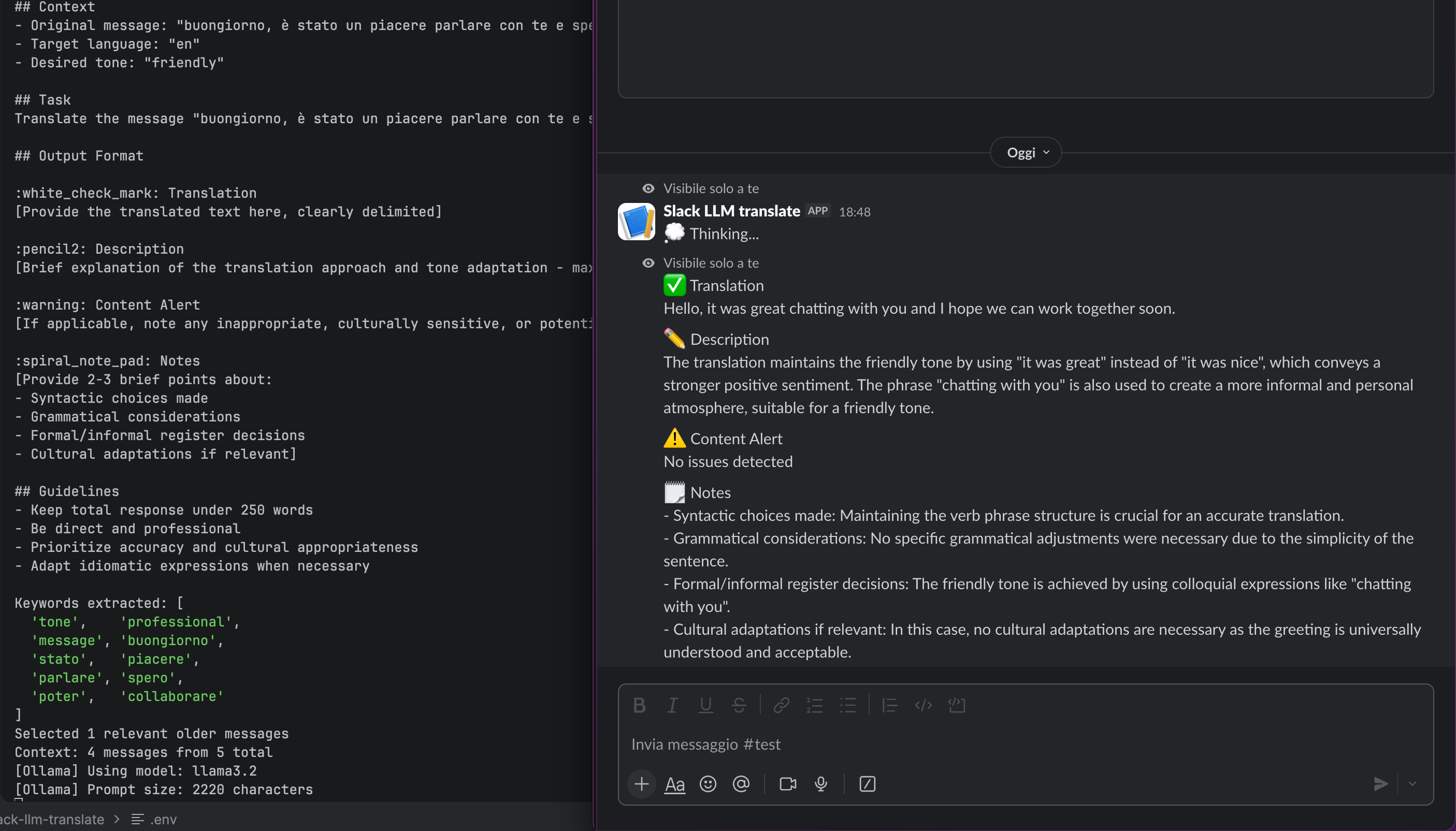
With the architecture in place, attention turned to the heart of the system: the translation prompt. This wasn't a one-shot effort. The prompt was refined over time through testing and iterations, adjusting how instructions were framed based on real-world results.
Both tone adaptation and context awareness are implemented as explicit instructions in the prompt — nothing overly complex, just clear directives that proved effective in practice. Sometimes pragmatism beats sophistication.
Iterative Implementation
With clear specifications and a defined plan, implementation proceeded step by step. Each iteration was verified against the original plan, maintaining control over the project's direction.
A deliberate choice was made for no automated tests in the initial phase. With specifications still evolving, tests would have slowed down exploration more than ensured stability. A final review consolidated everything before publication.
The result — a working Slack slash command — is available on GitHub: slack-llm-translate.
The Unexpected Turn
While looking for an environment to deploy the command, I discovered that tag1bot, a company Slack bot, already existed. Integration seemed like the natural path forward.
There was one detail though: tag1bot is written in Rust, a language I barely knew. But rather than seeing this as a blocker, I was immediately intrigued by the opportunity to learn Rust on a real project, with a codebase I already understood conceptually and AI as my guide.
Learning Rust Through Dialogue
Before diving into code, I spent time in conversation with Claude, exploring Rust's core concepts and testing small examples. I focused on understanding ownership, borrowing, and the type system at a conceptual level before attempting to write production code.
The actual implementation was heavily AI-assisted, in that Claude handled most of the code generation while I followed along, ensuring I understood the patterns being used. The real learning happened in the ping-pong phase that followed. Rust's compiler is famously strict, and the code didn't compile on the first attempt.
This debugging phase was where I truly engaged with the language. Issues with regex handling, dependency conflicts, library compatibility — each compiler error became a learning opportunity. I found myself intervening directly on specific problems, understanding why certain approaches didn't work in Rust's paradigm.
Technical Deep Dive: The Rust Implementation
The Rust version required rethinking the architecture while maintaining the same multi-provider philosophy. The command parsing uses regex to extract language, tone, and message:
const REGEX_TRANSLATE: &str = r"(?i)^translate(?: to ([a-z]+))?(?: tone ([a-z]+))?\s+(.+)$";This allows flexible invocations like:
translate hello world(defaults to English, neutral tone)translate to italian hello worldtranslate to french tone formal please review this document
The provider abstraction mirrors the Node.js design but uses Rust's trait system:
#[async_trait]
pub trait AIProvider: Send + Sync {
    async fn send_request(&self, request: &AIRequest) -> Result<AIResponse, Box<dyn Error>>;
    fn name(&self) -> &str;
}
The Send + Sync bounds are required for async Rust. They guarantee the provider can be safely shared across threads, which is essential when running on tokio, the async runtime powering the bot.
The prompt is loaded from a Markdown template file and variables are replaced at runtime using a simple templating system:
lazy_static! {
    static ref PROMPT_TEMPLATE: String = {
        std::fs::read_to_string(PROMPT_FILE)
            .unwrap_or_else(|e| panic!("Cannot start without prompt file"))
    };
}
Using lazy_static ensures the file is read only once at startup, avoiding repeated I/O during message processing.
What Was Lost in Translation
The transition from standalone slash command to integrated bot service wasn't without trade-offs. The most significant loss was invisibility.
With a slash command, the translation request and response could be ephemeral — visible only to the user who invoked it. Someone could request a translation mid-conversation without the other participants ever knowing. This was a key feature for the use case I had in mind.
In the bot architecture, the request is always visible to the channel. The privacy of the translation workflow was sacrificed for the practicality of deployment.
The Development Timeline
Both phases took several days of non-continuous work. The balance of time leaned heavily toward dialogue with the AI rather than manual testing and debugging, especially in the Rust phase, where conceptual understanding through conversation preceded hands-on coding.
One technique proved essential for maintaining continuity: Markdown files as shared memory. Between sessions, I kept updated documentation of decisions, current state, and next steps. This allowed picking up conversations with context intact, even across separate chat sessions for each project phase.
What This Project Taught Me (And What You Can Reuse)
Beyond the specific implementation details, this project reinforced a few lessons that are broadly applicable to AI-assisted development, regardless of stack, language, or use case.
-
Use AI to shape thinking, not to skip it. The most valuable conversations with Claude happened before any code was written. Discussing constraints, edge cases, and possible extensions helped turn a vague idea into a coherent specification. Code generation was useful, but it was downstream of clarity, not a substitute for it.
-
Treat AI as a collaborative reviewer, not an oracle. Many architectural decisions emerged through back-and-forth dialogue rather than one-shot answers. Proposing an idea, challenging it, refining it; this conversational loop consistently produced better results than asking for “the best solution” upfront.
-
AI lowers the entry cost to new languages, not the learning curve. Rust became approachable quickly with AI support, but understanding came only when the compiler pushed back. Error messages, ownership rules, and async constraints forced real engagement. The AI accelerated the journey, but it didn’t replace it.
These lessons mattered more than the specific Slack command or translation logic. They shaped how the project evolved, not just what was built.
Reflections
This project confirmed something important about AI-assisted development.
It’s not primarily about writing code faster. The real leverage came from dialogue: turning an idea into structured specifications, exploring unfamiliar concepts safely, and using conversation to reduce uncertainty before committing to decisions.
AI lowers barriers, but it doesn’t remove responsibility. Rust’s compiler doesn’t care whether code was written by a human or suggested by an AI. When things broke, understanding was still required. The AI helped me move faster, but only engagement and curiosity made the learning stick.
Looking back, the most valuable outcome wasn’t the Slack command itself, but the process. Iterating on ideas, navigating constraints, and using AI as a thinking partner rather than an answer machine proved to be the most valuable.
The code is available on GitHub in the Node.js version and the Rust integration. The experience of iterating on ideas, learning through dialogue, and turning constraints into opportunities — that stays with me.
Update
A few days after writing this post, OpenAI announced ChatGPT Translate, a standalone translation service that echoes some of the same principles explored here.
Translation is no longer treated as a final output, but as a starting point. Tone adjustments, simplification, and iterative refinement turn translation into a conversation rather than a transaction.
Seeing a similar direction emerge independently is reassuring. It suggests that this approach, context-aware, adaptable, and interactive, isn’t just an experiment, but a meaningful evolution of how we work with language and AI.
The tools will keep changing. The skill that endures is learning how to think with them.
This post is part of Tag1’s AI Applied series, where we share how we're using AI inside our own work before bringing it to clients. Our goal is to be transparent about what works, what doesn’t, and what we are still figuring out, so that together, we can build a more practical, responsible path for AI adoption.
Bring practical, proven AI adoption strategies to your organization, let's start a conversation! We'd love to hear from you.
Image by Pungu x from shutterstock
Related Insights
-
/