
Using AI to Move a 10-Year-Old Drupal Core Issue Forward

February 5, 2026
At Tag1, we believe in proving AI within our own work before recommending it to clients. This post is part of our AI Applied content series, where team members share real stories of how they're using Artificial Intelligence and the insights and lessons they learn along the way. Here, Charles Tanton (Software Engineer) explores how AI supported his improvements to the Optional Field Widget Ordering issue in Drupal core by accelerating progress on a long-stalled 10-year old problem.
Project Summary
This project focused on using AI to help resolve a long-standing Drupal core issue: Allow multiple field widgets to not use tabledrag (#2264739). The goal was simple but impactful: make it possible to disable drag-and-drop ordering for specific multi-value field widgets, instead of forcing all of them to be orderable. For years, the only practical option was a brittle patch that touched many core files and often broke on core updates, creating recurring maintenance work that nobody enjoyed. By pushing this core fix forward with AI as a coding partner, the aim is to remove that maintenance burden for good and give site builders more control over the form UX.
The Challenge
The core problem was that Drupal automatically renders multi-value fields in a table with tabledrag behavior, even when reordering is not needed. That table-based structure makes theming harder, complicates responsive layouts, and adds JavaScript overhead for no real benefit in many use cases. Our only workaround was a large, fragile patch from this very issue that had to be kept in sync across Drupal core releases by hand.
This AI Applied project set out to change that by getting a clean, configurable solution into core. The work included writing an improved merge request, updating the issue summary, and adding thorough test coverage, all geared toward making the change easy to understand, review, and eventually commit.
The Technical Overview
The first step was using AI to explore alternatives to the existing proposed fix and to see if there was a better architectural direction. After looking at the options together with AI, we confirmed that the original "orderable" setting approach was still the best fit, and then focused on strengthening it, especially around configuration schema. A key enhancement was the introduction of a shared field.widget.settings.base config schema so widgets could inherit the new orderable boolean cleanly instead of each re-defining it.
Across the project, AI helped with:
- Drafting a clearer, more complete issue summary that explains the problem, motivation, and proposed resolution.
- Building out comprehensive test coverage for affected multi-value widgets so regressions are caught automatically.
- Updating Twig templates and styling for the new non-orderable rendering path, including a simplified
field-multiple-value-without-order-formtemplate. - Getting unstuck on Git and GitLab workflows specific to Drupal core contributions, including issue forks and merge requests.
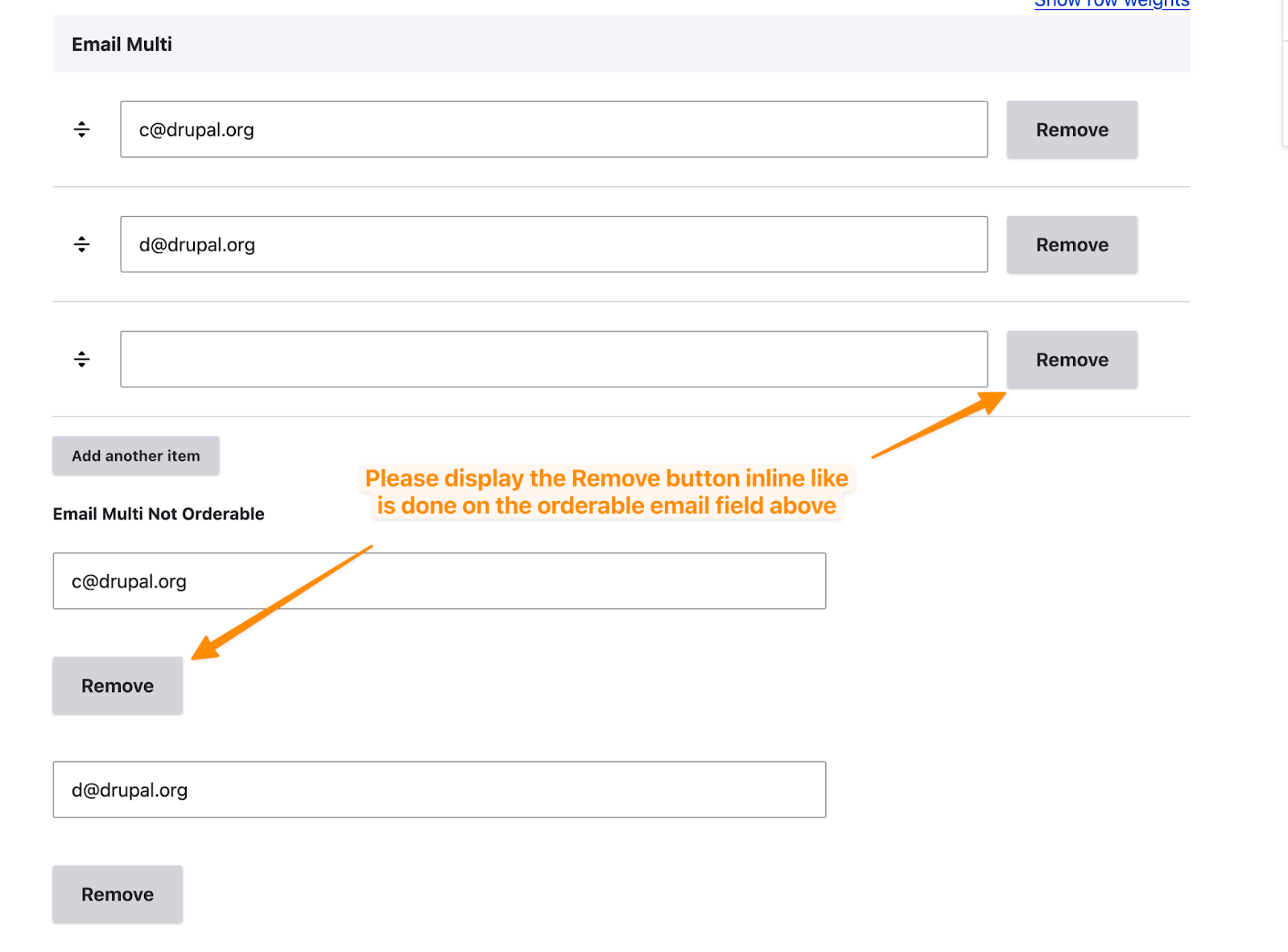
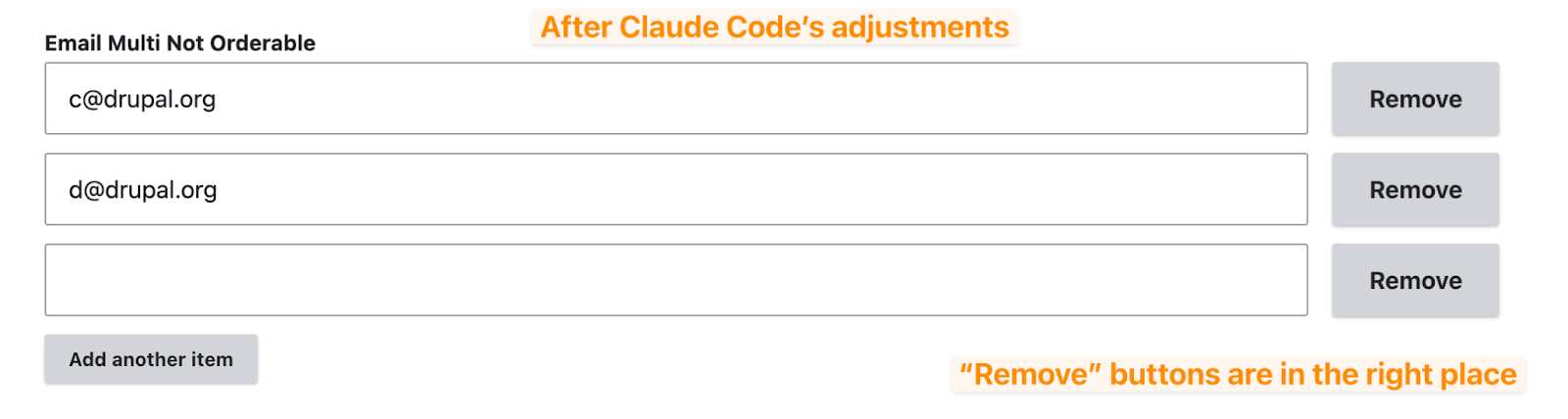
AI also sped up UI work by letting me paste screenshots into the coding environment so it could adjust CSS more accurately, instead of iterating blindly. Here’s an example:
Over time, I shifted from an earlier extension to a smoother Claude Code setup, supported by installing the ddev-claude-code integration so the assistant could run directly inside the DDEV container with GitLab CLI access.
AI Workflow
A few workflow patterns turned out to be especially helpful on this project:
Dedicated context folder
I added a .claude folder in the repo to hold plans, reference snippets, and docs like the Drupal config schema guide. This let me carry context between sessions and ask the AI to "open and update" specific plan files instead of re-explaining everything.
Plan-driven development
For larger theming or testing tasks, I asked the AI to first write a plan to a file (for example, @.claude/theming-plan-22-nov.md), then execute it step by step, pausing after each item for review. That structure made it much easier to course-correct early rather than cleaning up after a big batch of code.
Voice prompts for speed
Using dictation for prompts in the terminal helped reduce friction for small, repetitive questions or instructions. It was surprisingly effective for "talking through" next steps in a more natural way.
Deep reasoning prompts
Adding a keyword like "ultrathink" in key prompts encouraged the AI to reason more thoroughly before proposing code, which was particularly useful for tricky config and test design work.
On top of that, the ddev-claude-code installation was straightforward and lives right alongside normal Drupal tooling:
composer config extra.drupal-scaffold.allowed-packages --json --merge '["drupal/claude_code"]'
composer require --dev drupal/claude_code
ddev add-on get FreelyGive/ddev-claude-code
ddev restart
ddev claude
Results and Lessons Learned
The issue is still open, but the state of the work is very different from when this effort began. The implementation now uses a clean configuration schema pattern, has broad widget coverage, and includes extensive tests and documentation in the issue summary. Remaining tasks are mostly about theming and documentation polish before the merge request is ready for final review and potential commit.
This was my first serious use of AI for coding, so it naturally took longer than it would now that I have more experience. The upside is that it gave me a strong foundation for using AI as a regular programming tool, and it has since become part of my daily workflow.
If I were starting this same issue again today, I would:
- Ask the AI to generate full test coverage first, across all relevant widgets, to surface edge cases earlier.
- Lean heavily on a "plan mode" flow, approving each step in advance before code is written.
- Independently run and verify tests instead of trusting automated "all tests passed" claims.
- Keep prompts short and focused, especially around test generation, to avoid bloated code that is slow to review.
Real-World Applications
Contributions to Drupal core like this one tend to benefit every Drupal site over time. In this case, having an "Orderable" toggle for multi-value widgets will simplify maintenance by removing the need for a large, fragile patch and will improve form UX options for site builders. It's the kind of change that quietly pays off for years through cleaner upgrades and more flexible theming.
More broadly, this project is a concrete example of how teams can use AI to move long-standing open-source issues forward. It is especially valuable where the work involves a mix of architecture decisions, broad test coverage, and tedious but important updates across multiple components.
Expert Oversight Is Non-Negotiable
One of the most important lessons from this project is that expert oversight is essential. I saw multiple cases where the AI made questionable choices or leaned on weak assumptions in the code, which I only caught because I was reading closely and testing manually. Without that attention, the "help" would have turned into extra rework later.
Used well, AI acts as a powerful accelerator: it drafts, refactors, and suggests, while you stay accountable for direction, quality, and correctness. This project helped me build that mindset and gave me the confidence to make AI a normal part of my engineering toolkit. It also reaffirmed how valuable it is to practice with AI on internal or infrastructure-oriented work like this before applying it in higher-risk contexts.
This post is part of Tag1’s AI Applied series, where we share how we're using AI inside our own work before bringing it to clients. Our goal is to be transparent about what works, what doesn’t, and what we are still figuring out, so that together, we can build a more practical, responsible path for AI adoption.
Bring practical, proven AI adoption strategies to your organization, let's start a conversation! We'd love to hear from you.
Image by FranFrank96 from Shutterstock
Related Insights
-
/